

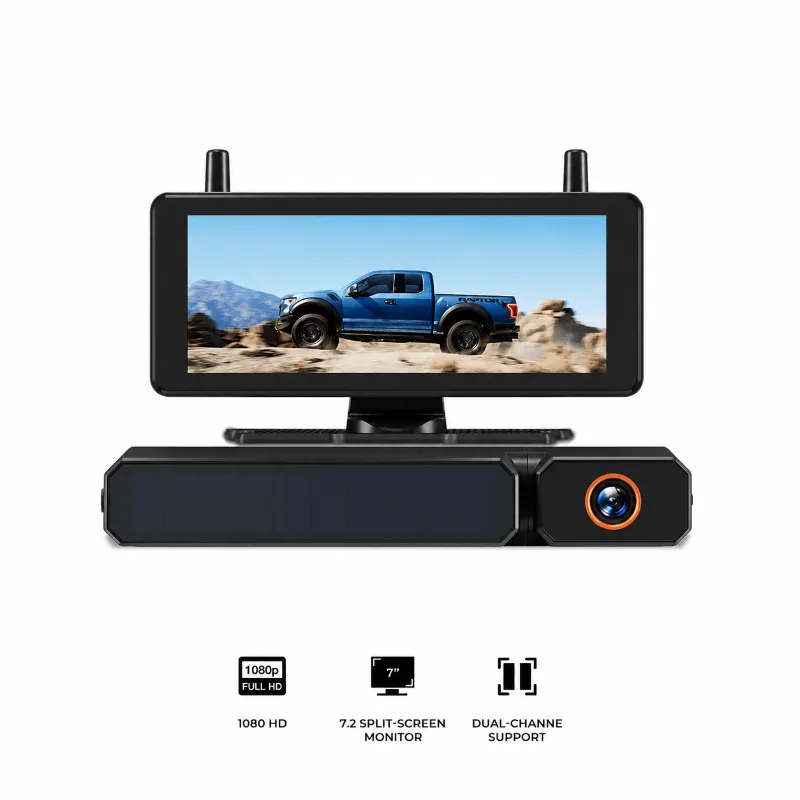
Installing a backup camera wireless setup on your vehicle without drilling requires mounting the camera bracket behind your license plate screws and powering the display via your 12V accessory port. You do not need to punch holes through your trunk lid, cut through sheet metal, or splice into factory wiring harnesses. By using existing screw holes and modern digital wireless transmission, you can complete the entire job in under thirty minutes.
Whether you drive a compact sedan, an older commuter car, or need a rear view camera for truck use, drill-free hardware keeps your vehicle body intact, prevents rust, and protects lease terms.
Why Choose a Backup Camera Wireless Setup Without Drilling?
Traditional car reverse camera installations demand running video cables through door sills, firewall grommets, and tailgate weatherstripping. If you drill a hole for cabling through the trunk lid, you risk water leaks, paint chipping, and long-term corrosion.
Modern backup camera systems solve this problem by pairing a wireless transmitter with a dedicated receiver. Higher-end models like the auto vox solar wireless backup camera take convenience a step further by integrating solar panels and a rechargeable battery directly into the license plate frame. That means you do not even need to tap into reverse light wires for camera power.
If you are shopping for a complete kit, you can check the latest price to see current promotions before you get started.
What You Need Before You Start
You do not need specialized automotive tools for this project. Gather the following basic supplies:
- A Phillips head screwdriver or socket wrench that matches your license plate screws
- Rubbing alcohol and a clean microfiber cloth to prep mounting surfaces
- Zip ties to secure any loose interior monitor cables
- The camera, mounting bracket, wireless transmitter, and display unit
Before mounting anything permanently, perform a quick bench test. Plug the monitor into your vehicle cigarette lighter or USB port, power the camera according to the instruction booklet, and confirm that the monitor displays a clear video feed. This ensures the components are paired and functional before you attach them to the car.
Step-by-Step Drill-Free Installation Guide
Follow these steps to install your auto vox backup camera cleanly without altering your vehicle body.
Step 1: Remove Your Rear License Plate
Unscrew the top two bolts holding your rear license plate in place. Set the screws aside in a safe spot. Clean the area behind the plate thoroughly with rubbing alcohol to remove road grime, salt, and dirt.
Step 2: Mount the Camera Bracket
Position the camera bracket directly over or behind your license plate mounting holes. Most kits feature slotted holes so you can center the lens easily. Reinstall the factory screws through both the camera bracket and the license plate, tightening them securely so the camera does not shift when driving over bumps.
If your camera uses an integrated solar frame, your exterior installation is effectively finished. If your camera requires 12V power from the reverse lights, route the thin power lead behind the license plate light housing or through an existing rubber body plug into the trunk space, avoiding the need for any drilled holes.
Step 3: Install the Interior Display
Place your monitor in a location that offers clear visibility without blocking your forward view of the road. Most kits come with a suction cup or adhesive dash mount:
- Clean the dashboard or windshield surface with alcohol.
- Firmly press the suction mount or adhesive pad onto the surface.
- Attach the monitor and adjust the viewing angle so it is visible from your driving position.
If you prefer a cleaner dashboard, consider a digital mirror or mirror dash cam that clips directly over your existing rearview mirror.
Step 4: Route Interior Power
Plug the monitor power adapter into your front 12V auxiliary outlet. Tuck the excess power cable along the seam of the dashboard or under the center console trim using a plastic pry tool or your fingertips. This keeps your cabin tidy and prevents wires from catching on controls.
Step 5: Calibrate the Parking Guidelines
Turn your ignition on and power up the screen. Most backup camera with monitor systems let you adjust guide lines up, down, left, or right via menu buttons on the display. Park your car roughly two feet away from a curb or wall, check the screen, and align the red zone with the edge of the obstacle.
Solar vs. 12V-Wired Wireless Systems
Not all wireless setups handle power the same way. Review the table below to see how standard wireless and solar wireless options compare:
| Feature | Solar Wireless Camera | 12V-Tapped Wireless Camera |
|---|---|---|
| Drilling Required | None | None (use existing grommets) |
| Reverse Light Splicing | No | Yes (for auto-on reverse) |
| Installation Time | 10 to 15 minutes | 30 to 45 minutes |
| Power Source | Solar cell + internal battery | Vehicle 12V electrical system |
| Vehicle Suitability | Cars, SUVs, light trucks | Sedans, larger trucks, trailers |
Independent testing in this Auto-Vox Back Up Camera Review highlights how stable digital wireless frequencies have become compared to older analog versions that suffered from interference. If you want to order a system for your vehicle, remember to grab the code to save on your order.
Choosing the Right Display: Dash Monitor vs. Digital Mirror
When adding a car backup camera to your setup, display placement plays a major role in day-to-day usability.
Standalone Dash and Windshield Monitors
Standalone monitors range from 4.3 inches to 7 inches. They mount via suction cups to the glass or via adhesive pads to the dashboard. They are easy to install, simple to reposition, and allow you to view parking lines without glancing upward. However, they take up dashboard space and add another screen to your interior view.
Mirror-Mounted Displays
A reverse camera mirror attaches directly over your factory rearview mirror using rubber straps. When the car is in drive, it acts as a normal reflective mirror. When you engage reverse, the built-in LCD screen lights up behind the reflective glass to show the camera feed. This option keeps your dashboard completely clear of clutter and preserves an original-equipment look.
Tips for the Strongest Wireless Signal
While modern digital signals handle typical car lengths easily, longer vehicles like work vans or pickup trucks with metal beds can encounter signal resistance. Keep these best practices in mind:
- Keep the antenna free of obstruction: Ensure the transmitter antenna is not buried inside a metal frame rail.
- Angle the camera correctly: Adjust the vertical pitch so you can see your rear bumper and the road behind you simultaneously.
- Clean the lens regularly: Road spray and rain can obscure the lens quickly, especially during wet seasons.
Before finalizing your setup, visit the coupon page to confirm any model updates or bundle deals on accessories. For more background on feature pricing and sales cycles, see this coverage explaining how The Auto Vox Wireless Backup Camera Is 42% Off during major promotional windows. With the right hardware and a drill-free mount, you can upgrade your vehicle safety quickly and maintain total peace of mind on the road.
 Shopping at AUTO-VOX? See today's verified AUTO-VOX discount code
Frequently asked questions
Can I install a backup camera wireless system with zero wiring?
Yes, a solar-powered backup camera wireless unit requires no drilling at all, as it mounts to your license plate frame and charges via sunlight without tapping into reverse light wires.
Will a drill-free backup camera fit my specific license plate?
Most wireless models feature a small camera bracket with universal screw slots designed to fit directly behind standard automotive license plate bolts.
Do wireless backup cameras suffer from signal lag or interference?
Digital wireless backup cameras operate on an encrypted point-to-point 2.4 GHz digital frequency, which eliminates interference from Wi-Fi routers and nearby Bluetooth devices.
How do I power a camera that needs 12V if I do not drill holes?
Yes, if your car has an existing rubber wiring grommet or license plate light opening, you can feed a thin 12V wire through it into the trunk without drilling metal.
How do I keep the rear camera lens clean in winter?
You can clean the lens gently using a soft microfiber cloth and standard automotive glass cleaner or mild soapy water; avoid abrasive pads that scratch the plastic coating.