
Are 3D Print Filament Swatches Worth It? Testing Before You Buy Full Spools

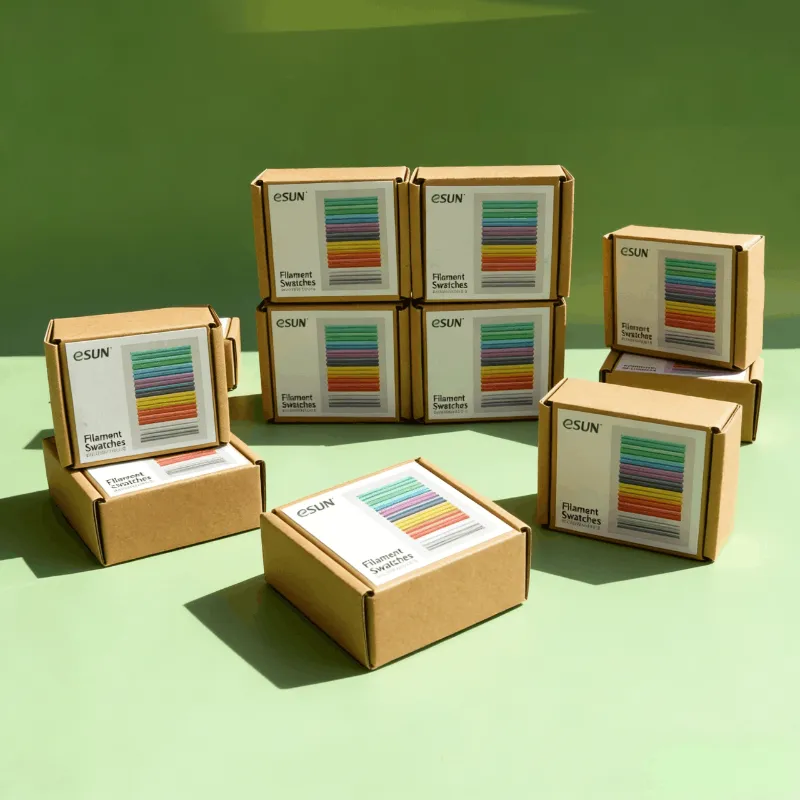
Are 3D Print Filament Swatches Worth the Effort?
Yes, 3d print filament swatches save money and disappointment by letting you test material properties, color accuracy, and finish quality before you commit to a full spool. We print small tagged samples from each new filament type—esun filament, specialty blends like marble pla, or exotic materials such as peba filament—and catalog them in a physical reference library that answers the question "will this actually look right?" faster than any product photo.
A swatch system pays for itself after the first avoided mistake. Whether you are comparing silk pla sheens or deciding between standard and carbon-fiber reinforced materials, tangible samples eliminate guesswork.
What Makes a Good Filament Swatch System
The best filament swatch system balances speed, information density, and physical durability. We have tested dozens of STL designs and settled on a workflow that works for both 1.75 mm filament 3d printer spools and less common diameters.
Core elements of our system:
- Standardized geometry – Flat base for stability, raised text area for labeling, and a curved or textured zone to show surface finish
- Embossed metadata – Material type, brand, color name, and purchase date printed directly into the swatch
- Consistent size – 50 to 70 mm swatches fit in drawer organizers and stack cleanly
- Hole for binding – A 5 mm hole lets you thread swatches onto a ring or dowel for quick flipping
Popular parametric models like Parametric Filament Swatches (3 lines of text) by Espariz let you customize text fields in your slicer before printing. You can find dozens more free filament swatch STL files on aggregator sites, or design your own with a flat base and text placeholders.
We print every new spool's swatch at 0.2 mm layer height with default settings—no tuning. That snapshot of out-of-the-box performance tells you whether a material needs profile tweaks or works immediately.
Testing Specialty Filaments With Swatches
Swatches shine brightest when you are evaluating materials that behave or look dramatically different from standard pla 1.75mm filament. Specialty blends often photograph poorly, and their real-world appearance under room lighting can surprise you.
Materials that benefit most from physical swatches:
- Carbon fiber composites – cf petg and petg cf filament show matte texture and fiber pattern that screens cannot convey
- Silk and metallic finishes – silk pla and esun rgb pla shift color with viewing angle; a swatch captures that iridescence
- Translucent and marble blends – marble pla reveals its vein density and contrast only in a printed part
- Flexible materials – tpu dark magic tpu 95a filament 1.75mm 1kg swatches let you physically test Shore hardness and flex recovery
- Enhanced PLA formulations – pla+ filament claims better layer adhesion; a swatch gives you a bend-test sample
We keep a separate binder section for vendor-specific lines—Bambu Lab filament swatches, Sunlu filament swatches, and Creality filament swatches—because the same color name can vary between brands. A sunlu pla 2 cmyk magenta filament swatch placed next to another manufacturer's magenta reveals real-world differences instantly.
Check the latest eSUN pricing and grab our code to save on your next sample order.
How to Organize and Label Your Filament Color Finder
A swatch library only works if you can find the right sample in under ten seconds. We treat ours as a filament color finder system, organized by material family first, then hue or finish.
Our three-tier organization:
- Material type – PLA, PETG, TPU, ABS, specialty (nylon, polycarbonate, composites)
- Finish or blend – Standard, silk, matte, carbon fiber, wood fill, marble
- Color family – Reds, blues, neutrals, gradients
Ring binders with tabbed dividers work well for small collections under fifty swatches. Larger libraries benefit from drawer organizers or hanging file systems where each swatch stands upright.
We print a QR code or short URL on each swatch linking to a spreadsheet row with purchase date, supplier, print temperature, and notes. That turns a physical sample into a portal for historical data without cluttering the swatch itself.
For digital cross-reference, photograph each swatch on a neutral gray background under daylight-balanced LED lighting. Store those images in a folder named by material and color so you can compare candidates on-screen before pulling physical samples.
Building Your Swatch Library on a Budget
You do not need to buy sample spools to build a useful 3d print filament swatches collection. Start with leftovers from failed prints, spool ends, and the small amounts remaining after a project wraps.
Cost-effective strategies:
- Print swatches during calibration – First-layer tests and temperature towers already consume filament; add a swatch to the build plate
- Coordinate group buys – Split variety packs with local maker groups so everyone prints swatches from shared materials
- Recycle purge towers – If you run a multi-material printer, save purge blocks as informal color references
- Target sales and bundles – Grab the code at our eSUN page for 5% off full spools, then print swatches immediately
We budget roughly 10 to 15 grams per swatch, meaning a single 1 kg spool yields around sixty samples if you dedicate it entirely to library building (though in practice you will print functional parts and add swatches opportunistically).
Within six months of casual printing, most makers accumulate enough material variety to justify a formal swatch system. Label and organize retroactively—it takes an afternoon and transforms a pile of test prints into a searchable reference.
Comparing Swatch Systems: Rings vs. Binders vs. Wall Panels
We have tested three popular physical arrangements for organizing swatches, each with trade-offs in space, speed, and expandability.
| System | Best For | Drawbacks |
|---|---|---|
| Metal rings or carabiners | Portable kits, limited collections (under 30 swatches) | Hard to insert new swatches in sorted order |
| 3-ring binders with sheet protectors | Large libraries (50+ swatches), archival storage | Requires turning pages, slower browsing |
| Pegboard or wall-mounted panels | Studio display, quick visual scanning | Takes wall space, limited by panel size |
We use binders for our main archive and a small ring set of "greatest hits"—the twenty colors and materials we reach for most often—kept at the printer station. That hybrid approach gives us portability when we need it and depth when we are planning a new project palette.
Wall panels work beautifully as a filament color finder in shared makerspaces where visual browsing helps new members discover available materials. Attach swatches with hook-and-loop dots so you can rearrange them as inventory changes.
When to Skip Swatches and Just Order the Spool
Swatches add workflow overhead, and some situations do not justify the extra step. We skip swatch printing when budget or timeline pressures override color-matching precision.
Scenarios where we order full spools directly:
- Replenishing a known favorite – If you have already printed with a material and logged good results, reordering needs no test
- Bulk orders for production runs – When you are printing fifty identical parts, a 10-gram swatch will not tell you anything new about dimensional accuracy or warp at scale
- Time-critical projects – If you need parts printed this week, waiting for a swatch print and evaluation adds delay
- Neutrals and hidden components – Black or white filament for internal brackets rarely needs color verification
For high-stakes aesthetic projects—cosplay armor, architectural models, client prototypes—swatches remain essential. The hour you spend printing and comparing samples can prevent a week of disappointment and material waste.
Before ordering, visit our eSUN coupon page to check current pricing and apply our 5% discount code. Pair that saving with smart swatch testing to maximize both quality and budget.
Frequently asked questions
How much filament does a 3d print filament swatch use?
Most swatch designs use 10 to 15 grams of filament per sample, which translates to roughly 60 to 100 swatches per kilogram spool. Print time averages 20 to 40 minutes depending on size and layer height.
Can I use the same swatch STL for PLA and flexible filaments?
Yes, but print flexible materials like TPU at slower speeds and with adjusted retraction. The geometry works for any filament type, though very soft TPU may need increased wall thickness to prevent warping during removal.
Do I need different swatches for 1.75 mm and 2.85 mm filament?
No. Swatch geometry is independent of filament diameter since both sizes extrude through the same nozzle and produce identical surface finishes. Label each swatch with diameter so you do not confuse inventory.
How do I compare silk PLA colors accurately with swatches?
Print swatches with identical layer height and orientation, then view them under the same lighting you will use for finished parts. Rotate each sample to see how the silk finish shifts color at different angles.
Should I organize swatches by brand or by color?
Organize by material type first, then by color family. Group brand-specific collections like eSUN filament or Bambu Lab filament into subsections so you can quickly compare the same color across manufacturers.
Can I sell or trade filament swatches with other makers?
Yes, many maker communities organize swatch swaps where members print samples from their collections and trade. This builds everyone's reference library without purchasing full spools of every color.