
How to Print With TPU 95A Filament: Settings and Tips for Flexibility

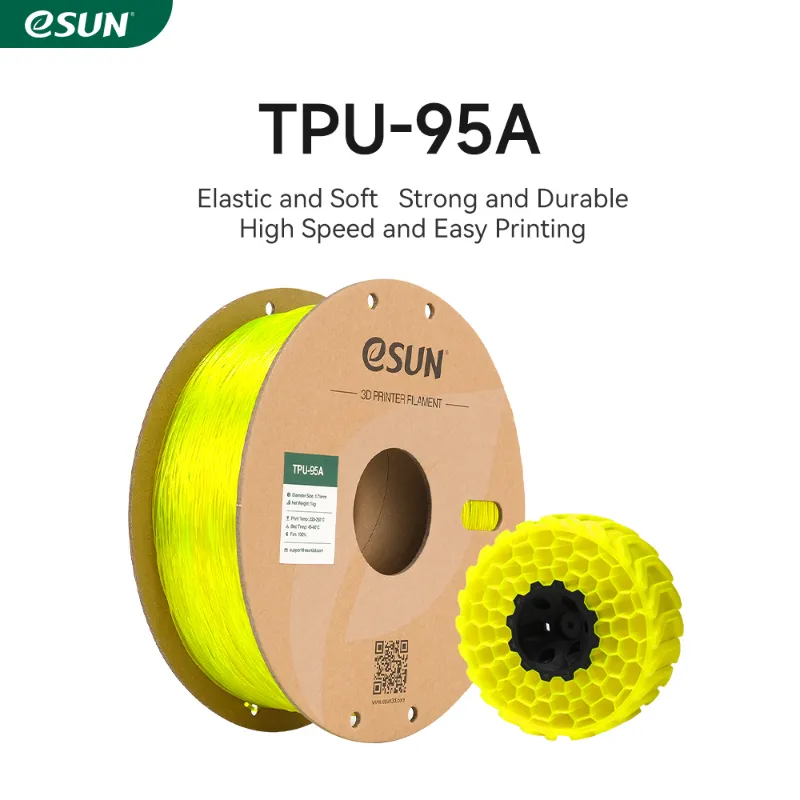
Printing with tpu dark magic tpu 95a filament 1.75mm 1kg requires slower speeds, minimal retraction, and direct-drive extrusion to prevent jamming and achieve the flexible, durable parts that make TPU valuable for phone cases, gaskets, and wearable components. Unlike rigid materials such as pla 1.75mm filament or cf petg, TPU 95A compresses under tension, so your extruder and slicer settings need careful tuning to handle its elastic behavior.
We tested TPU 95A across Bowden and direct-drive setups to identify the settings that consistently produce clean layers without stringing or under-extrusion. This guide walks you through bed preparation, temperature ranges, retraction adjustments, and troubleshooting the most common flexible-filament problems.
Why TPU 95A Filament Requires Different Settings
TPU (thermoplastic polyurethane) is a flexible elastomer that bends without breaking, rated by Shore hardness. The 95A rating sits in the semi-flexible range, offering more rigidity than softer TPU variants while still providing substantial give for functional parts. When you push or pull the filament through your extruder, it can buckle or compress instead of feeding smoothly, which causes jams in Bowden tubes and inconsistent extrusion.
Direct-drive extruders place the motor directly above the hotend, minimizing the filament path and keeping tension steady. Bowden setups route filament through a long PTFE tube, where TPU can coil or catch. If your printer uses a Bowden system, you can still print TPU by slowing down and disabling retraction, but direct-drive machines handle tpu dark magic tpu 95a filament 1.75mm 1kg with far less trial and error.
Shore 95A profiles are documented in community repositories like 3D Filament Profiles, which log tested parameters from other users and serve as a starting baseline for your own calibration.
Core Slicer Settings for TPU 95A Filament Success
Start with these parameters and tune in five-unit increments based on your first test print:
- Print speed: 20 to 30 mm/s for perimeters and infill. Faster speeds buckle the filament before it enters the hotend.
- First-layer speed: 15 mm/s. A slow first layer gives TPU time to adhere without dragging.
- Retraction distance: 0.5 to 1.0 mm on direct-drive, 2 to 3 mm on Bowden (or disable retraction entirely).
- Retraction speed: 20 to 25 mm/s. High-speed retractions yank the filament and cause grinding.
- Nozzle temperature: 210 to 230 °C. Begin at 220 °C and raise by 5 °C if layers separate.
- Bed temperature: 50 to 60 °C. TPU bonds to glass, PEI, and textured sheets without excessive heat.
- Cooling fan: 30 to 50 percent after the first layer. TPU needs some cooling to hold shape, but too much curls overhangs.
Disable coasting, z-hop, and wipe-on-retract in your slicer. These features add extra retractions or nozzle lifts that interrupt the continuous flow TPU requires. For comparison, rigid esun filament tolerates aggressive retraction and high speeds because it resists compression.
Bed Preparation and First-Layer Adhesion
TPU 95A sticks well to clean build surfaces without glue or tape. We recommend:
- PEI sheets: wipe with isopropyl alcohol before each print. TPU bonds strongly and peels away cleanly once cool.
- Glass beds: light coating of glue stick prevents over-adhesion. TPU can bond so tightly to bare glass that removal risks cracking the print.
- Textured powder-coated steel: works without additives. The micro-texture grips TPU while allowing flex during removal.
Level your bed carefully and set a z-offset that leaves the nozzle slightly higher than you would for pla+ filament. TPU squishes easily, so a too-low nozzle can create elephant's foot or jam the filament path. Run a single-layer square to verify that the bead spreads evenly without gaps or excessive pressure lines.
Check current pricing and grab our code before ordering spools to lock in the discount on TPU and other 1.75 mm filament 3d printer materials.
Adjusting Retraction and Travel Moves
Retraction on flexible filament is a compromise. Every retraction risks buckling the filament inside the extruder, but zero retraction produces stringing on travel moves. Test both extremes:
- Print a retraction tower with distance stepping from 0 to 3 mm in 0.5 mm increments.
- Inspect each segment for stringing versus layer gaps or clogs.
- Choose the smallest distance that keeps stringing acceptable.
For most direct-drive systems printing tpu dark magic tpu 95a filament 1.75mm 1kg, 0.5 to 1 mm balances the two issues. On Bowden printers, disabling retraction and accepting light stringing often yields better results than fighting mid-print jams. You can trim strings with a heat gun after the print finishes.
Increase your minimum travel distance to 3 or 4 mm so the slicer skips retraction on very short hops, and enable "avoid crossing perimeters" to route the nozzle inside the print boundary whenever possible.
Troubleshooting Common TPU 95A Print Problems
Under-extrusion or skipped layers: raise nozzle temperature by 5 °C, reduce print speed to 20 mm/s, and verify that your extruder tension is firm but not crushing the filament. TPU compresses under excessive idler pressure, which thins the effective diameter and starves the nozzle.
Stringing and oozing: lower temperature by 5 °C, increase retraction by 0.5 mm, or enable "combing" mode to keep travel inside the part. Accept that some stringing is normal with flexible materials.
Jamming in the hotend or Bowden tube: check for kinks or dirt in the PTFE liner, reduce retraction, and slow your print speed. If jams persist on a Bowden printer, consider upgrading to a direct-drive extruder or switching to firmer materials like petg cf filament for structural parts.
Layer separation: increase temperature, boost infill overlap to 25 percent, and verify that cooling fans are not blasting the part. TPU layers need heat to fuse.
When to Choose TPU 95A Over Rigid Filaments
Use TPU 95A for parts that must absorb impact, flex repeatedly, or seal against surfaces. Typical applications include phone cases, watch bands, shoe insoles, drone bumpers, and living hinges. The material resists tearing and returns to its original shape after deformation, properties that rigid options like silk pla or marble pla cannot match.
For decorative prints or parts that need dimensional precision, stick with PLA or PETG. TPU's flexibility makes it harder to achieve sharp corners and fine details, and the slow print speeds extend build times significantly. Commercial examples like Snapmaker TPU 95A highlight the balance between elasticity and printability that makes 95A Shore a practical choice for hobbyists.
Visit our coupon page to apply the current discount on your next spool order and explore compatible options across the esun filament range.
Storage and Shelf Life for TPU Filament
TPU absorbs moisture more slowly than nylon or peba filament, but humid storage still degrades print quality over months. Store your tpu dark magic tpu 95a filament 1.75mm 1kg spool in a sealed container with desiccant packs, and dry the filament at 50 °C for four hours in a dehydrator if you notice popping sounds or surface bubbles during extrusion. Proper storage keeps the material printable for years and prevents the brittleness that develops when moisture hydrolyzes the polymer chains.
Frequently asked questions
What print speed works best for TPU 95A filament?
Print TPU 95A at 20 to 30 mm/s for perimeters and infill, with first layers at 15 mm/s. Faster speeds cause the flexible filament to buckle in the extruder and lead to jams or under-extrusion.
Can I print TPU Dark Magic on a Bowden extruder?
Yes, but disable or minimize retraction and slow your speed to 20 mm/s. Direct-drive extruders handle TPU 95A more reliably because the shorter filament path prevents compression and tangling inside the PTFE tube.
How do I stop TPU filament from stringing?
Lower your nozzle temperature by 5 °C, increase retraction distance by 0.5 mm if your extruder allows it, and enable combing mode to reduce travel moves over open air. Some stringing is normal with flexible materials.
What bed surface works best for TPU 95A?
PEI sheets and textured powder-coated steel hold TPU well and release cleanly once cool. On glass beds, apply a thin layer of glue stick to prevent the filament from bonding too strongly and cracking during removal.
Do I need to dry TPU filament before printing?
TPU absorbs moisture slowly, but if you hear popping or see surface bubbles, dry the spool at 50 °C for four hours. Store filament in a sealed container with desiccant to maintain print quality.
What temperature should I use for TPU 95A?
Start at 220 °C and adjust in 5 °C increments. If layers separate or adhesion is weak, raise the temperature to 230 °C. Keep your heated bed between 50 and 60 °C for best first-layer adhesion.