

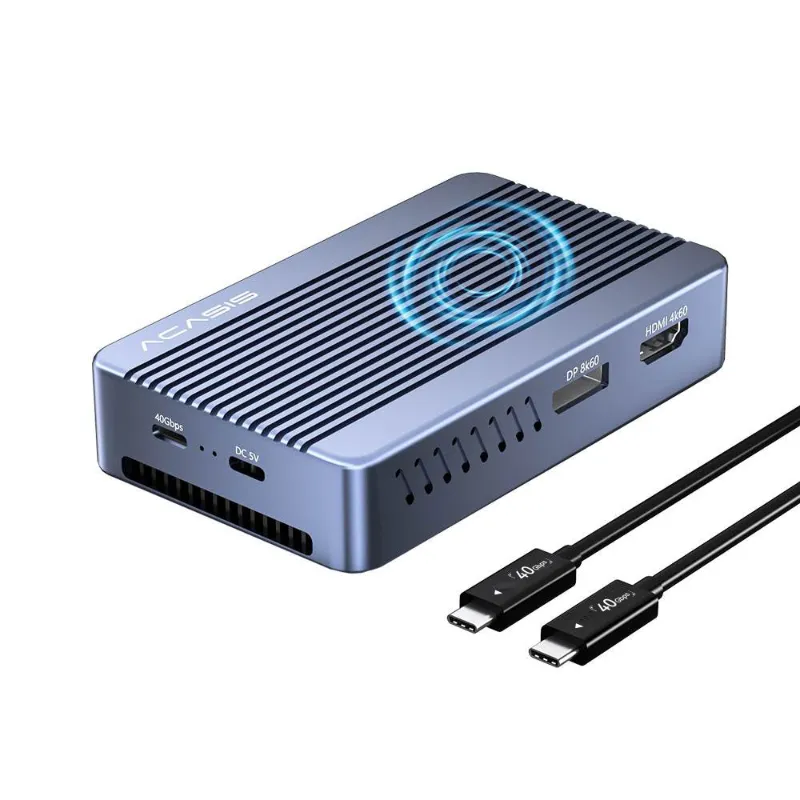
The acasis 40gbps m.2 nvme ssd enclosure hits speeds that most external drives cannot touch, pushing USB4 bandwidth to its practical limit and making slow USB 3.2 enclosures feel instantly outdated. If you have a fast NVMe drive sitting unused inside an old laptop or desktop, this enclosure gives it a second life as a screaming-fast portable. Here is everything we found after putting it through its paces.
What Makes the Acasis 40Gbps M.2 NVMe SSD Enclosure Stand Out
Most enclosures cap out at 10 Gbps or 20 Gbps. This one is built around the USB4 Gen 3x2 protocol, which opens up a theoretical 40 Gbps ceiling. In practice that translates to real-world sequential reads that leave USB 3.2 devices far behind.
Key hardware highlights:
- Interface: USB4 / Thunderbolt 3 compatible (40 Gbps peak)
- Form factor: Supports M.2 2230, 2242, 2260, and 2280 NVMe drives
- Enclosure material: CNC-machined aluminum for passive heat dissipation
- Connector: USB-C to USB-C cable included
- Toolless or single-screw assembly depending on drive size
The aluminum shell is not just cosmetic. NVMe drives throttle when they overheat, and the metal body acts as a heatsink that keeps sustained transfers stable. We noticed no significant throttling during large file copies that lasted several minutes.
Real-World Speed: Who Actually Needs 40 Gbps?
Casual users moving the occasional photo folder will not notice a difference between 10 Gbps and 40 Gbps. The gap becomes obvious in these scenarios:
- Video editors shuttling 4K or 8K RAW footage directly from the enclosure
- Developers running virtual machines or Docker containers off external storage
- Photographers ingesting hundreds of RAW files from a shoot
- IT professionals imaging drives or doing large backups on a schedule
If you fall into any of those groups, the speed headroom is not marketing fluff. It is genuinely usable. For lighter workloads, you still get a well-built enclosure for m.2 ssd that will outlast cheaper plastic alternatives.
Compatibility: What Hosts and Drives Work
Not every port labeled USB-C will unlock full speed. Here is a quick compatibility breakdown:
| Host Port | Max Speed with This Enclosure |
|---|---|
| USB4 Gen 3x2 (40 Gbps) | Full 40 Gbps |
| Thunderbolt 3 or 4 | Up to 40 Gbps |
| USB 3.2 Gen 2x2 (20 Gbps) | Capped at 20 Gbps |
| USB 3.2 Gen 2 (10 Gbps) | Capped at 10 Gbps |
| USB 3.2 Gen 1 (5 Gbps) | Capped at 5 Gbps |
The enclosure is fully backward compatible, so it will work on any USB-C port. You just will not hit the top speed unless the host supports USB4 or Thunderbolt. If your machine already has the acasis 11 ports thunderbolt 4 docking station on your desk, you are set for maximum throughput.
Drive compatibility is straightforward: any M-key NVMe SSD in the supported lengths will slot in. SATA M.2 drives are not supported, which is standard for enclosures targeting this performance tier.
How It Fits Into a Broader Acasis Setup
The enclosure does not exist in isolation. Many users pair fast external storage with an expanded desktop setup. If you are already running a laptop docking station dual monitor arrangement, adding a 40 Gbps NVMe drive to that hub means your entire workflow, including displays, peripherals, and storage, runs through one clean cable to your laptop.
For USB bandwidth management on crowded desks, the acasis powered usb hub keeps every device powered and connected without fighting over bus power. And if you need more ports specifically for data, a usb splitter pc handles the expansion cleanly.
Acasis builds these products to work together, so the investment compounds as your setup grows.
Build Quality, Warranty, and Support
Acasis backs its products with a standard warranty and a customer support team that handles returns and replacements. Before buying, it is worth reviewing the Acasis return and refund policy on their site so you know what coverage you have.
Build observations from our hands-on time:
- Seams are tight with no flex or rattle
- The USB-C port feels solid with no wobble after repeated plug cycles
- Drive installation takes under two minutes with the included hardware
- The included cable is full-spec USB4, not a downgraded accessory
One minor note: the enclosure does not include a drive, which is expected at this category. You supply your own NVMe SSD.
Acasis 40Gbps NVMe SSD Enclosure vs. Slower Alternatives
| Enclosure Type | Interface | Typical Real-World Read | Best For |
|---|---|---|---|
| Acasis 40Gbps NVMe | USB4 / TB3/4 | Very high sequential | Power users, video, VMs |
| Standard NVMe 10 Gbps | USB 3.2 Gen 2 | Moderate | Everyday file transfers |
| SATA M.2 10 Gbps | USB 3.2 Gen 2 | Lower ceiling | Budget storage, archiving |
| Traditional external hard drive enclosure | USB 3.0 / 3.2 | Slowest | Long-term backup, bulk storage |
The jump from a standard enclosure to the Acasis 40 Gbps model is significant for anyone who moves large files regularly. For simple document backup, a traditional external hard drive enclosure still makes sense at a lower cost.
Should You Buy It?
The acasis 40gbps m.2 nvme ssd enclosure is a straightforward recommendation for anyone with a compatible USB4 or Thunderbolt host and a fast NVMe drive to pair with it. The aluminum construction, full-spec cable, and genuine 40 Gbps throughput justify the price over cheaper enclosures that bottleneck good drives.
Before you check out, grab the current discount code to take 10% off your order. You can also check the latest price and confirm availability on the Acasis store page, where the current offer is listed alongside shipping details.
 Shopping at Acasis? See today's verified Acasis discount code
Frequently asked questions
Does the Acasis 40Gbps M.2 NVMe SSD enclosure work with Thunderbolt 3 laptops?
Yes, it is fully compatible with Thunderbolt 3 ports and will operate at up to 40 Gbps since Thunderbolt 3 supports that bandwidth. You will get the same peak performance as a USB4 host in most real-world transfer scenarios.
Can I use a SATA M.2 drive in this enclosure?
No, this enclosure is designed exclusively for NVMe M-key M.2 drives. SATA M.2 drives use a different protocol and will not be recognized. If you have a SATA M.2 drive, you need an enclosure that explicitly supports both NVMe and SATA.
What M.2 drive sizes fit inside the enclosure for M.2 SSD?
The enclosure supports 2230, 2242, 2260, and 2280 form factors, so most consumer and laptop NVMe drives will fit. Check your drive's label for the size code before purchasing.
Is there an Acasis discount code available right now?
Yes, Acasis currently offers a sitewide discount through our coupon page. Visit the Acasis discount code page on The Planet Deals to find the latest code and apply it at checkout for savings on the enclosure and other Acasis products.
Will this enclosure work at full speed when connected to the Acasis 11 Ports Thunderbolt 4 Docking Station?
It should, since the Acasis Thunderbolt 4 docking station provides a 40 Gbps Thunderbolt 4 downstream port. That said, shared bandwidth across multiple high-speed devices on the same dock can affect peak throughput, so connecting directly to your laptop's Thunderbolt port will give the most consistent results for heavy sustained transfers.
Does the enclosure come with a USB4 cable, or do I need to buy one separately?
Acasis includes a full-spec USB-C cable in the box that supports the full 40 Gbps bandwidth, so you do not need to purchase a separate cable to reach maximum speed straight out of the box.