

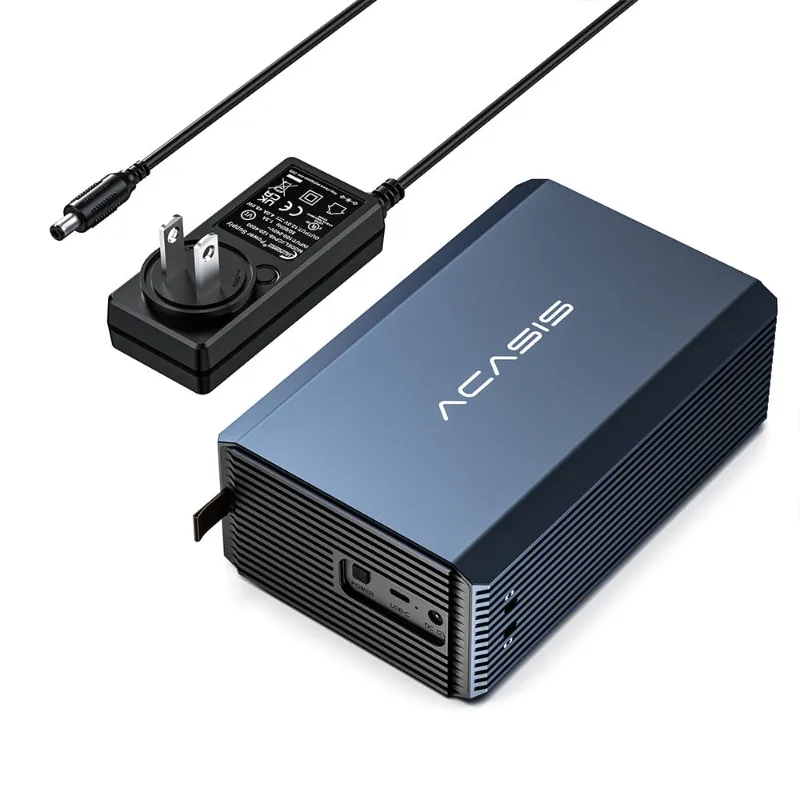
The acasis 40gbps m.2 nvme ssd enclosure is the centrepiece of ACASIS's storage lineup, turning a bare NVMe drive into a blazing-fast external drive you can plug into any Thunderbolt or USB4 port. Build the rest of your desk around it with the right dock, hub, and capture card, and you get a genuinely tidy, high-performance workstation without a cable jungle.
Why the Acasis 40Gbps M.2 NVMe SSD Enclosure Deserves the Top Spot
Most external enclosures cap out at 10 Gbps. This one runs at 40 Gbps over Thunderbolt 3/4 or USB4, which means real-world sequential read and write speeds that keep up with internal NVMe performance for video editing, large file transfers, and OS booting from an external drive.
Key reasons it stands out:
- 40 Gbps bandwidth saturates even the fastest consumer NVMe drives
- Tool-free or minimal-screw assembly on most configurations keeps swapping drives painless
- Broad compatibility with M.2 2230, 2242, 2260, and 2280 form factors
- Compact aluminium shell doubles as a passive heatsink, keeping thermals in check during sustained transfers
If you already own a spare NVMe drive or are upgrading a laptop's internal SSD, the enclosure for m.2 ssd category on the ACASIS store gives you a direct path to repurposing it. You can also check the latest price and grab a discount code before you check out.
Docking Stations: Turn One Cable Into a Full Workstation
A good dock multiplies every port on your laptop. ACASIS makes several worth knowing about.
| Product | Best For | Highlight Spec |
|---|---|---|
| acasis 11 ports thunderbolt 4 docking station | Power users, creative pros | 11 ports, TB4, up to dual 4K display |
| laptop docking station dual monitor | Dual-screen productivity setups | Dual monitor output, wide OS support |
| docking station laptop | Everyday office use | Compact, plug-and-play |
| usb c docking | Budget-friendly USB-C desks | USB-C passthrough charging |
For anyone running an Acasis dual monitor docking station setup, Acasis docking station compatibility spans most modern Windows and macOS machines that carry a USB-C or Thunderbolt port. Always confirm your laptop's DisplayPort Alternate Mode or Thunderbolt version before ordering.
The acasis 11 ports thunderbolt 4 docking station is the flagship here. Eleven ports on a single-cable dock covers dual 4K monitors, Ethernet, multiple USB-A and USB-C peripherals, and SD card slots simultaneously, which is what makes it the most-reviewed option in the Acasis Thunderbolt 4 docking station category.
USB Hubs and Splitters: Solving the Port Shortage
Even a good dock can run short of USB-A slots once you add a keyboard, mouse, webcam, and audio interface. That is where ACASIS's hub range earns its keep.
- The acasis powered usb hub delivers dedicated power to each port, so bus-powered devices like external drives and charging cables do not compete for current.
- The multiple usb port hub is the go-to for adding a bank of USB-A slots to a monitor arm or under a desk, out of sight.
- The usb splitter pc works for simpler scenarios where you just need two or three extra ports without a powered brick.
A powered hub matters most when you are running the external hard drive enclosure alongside charging devices. Unpowered hubs sometimes fail to spin up 2.5-inch drives reliably, especially under simultaneous load.
Content Creation Accessories: Capture Card and Phone Dock
Two ACASIS products serve a niche but fast-growing audience of streamers and mobile-first creators.
The switch capture card lets you record or stream Nintendo Switch (or other HDMI sources) without a dedicated gaming PC doing all the work. Acasis switch capture card features typically include plug-and-play USB capture at 1080p60, which pairs cleanly with OBS and similar software.
For iPhone users building a desk recording or productivity setup, the phone docking station for iphone handles charging and stand positioning simultaneously, so your phone becomes a secondary camera or video call display without flopping around on a stand.
How to Build a Clean ACASIS Desktop Setup
Combining these products in the right order is what prevents cable chaos:
- Start with your storage. Mount your NVMe drive in the acasis 40gbps m.2 nvme ssd enclosure and connect it to your laptop's fastest port (Thunderbolt or USB4 preferred).
- Add a dock. Run a single Thunderbolt cable from your laptop to the docking station. This one cable powers your monitors, Ethernet, and downstream USB devices.
- Expand USB where needed. Plug the powered USB hub into one of the dock's USB-A or USB-C ports to handle the remaining peripherals cleanly.
- Place the phone dock and capture card. Both sit neatly on the desk surface and connect via USB to the hub or dock, keeping desktop clutter minimal.
Following this layout means your laptop connects to exactly one cable to become a full workstation, and disconnects just as fast when you need to go mobile.
Where to Buy and How to Save
All of the products above are available directly through the ACASIS store. Grab the current 10% off code at our coupon page before adding anything to your cart. It is worth checking Acasis free shipping policy and Acasis return and refund policy on the store page at the same time, since both can affect the total cost of an order, especially for larger items like docking stations.
ACASIS also offers an Acasis warranty and customer support channel for products that arrive with defects, so keep your order confirmation email handy after purchase.
 Shopping at Acasis? See today's verified Acasis discount code
Frequently asked questions
Is the acasis 40gbps m.2 nvme ssd enclosure compatible with both Thunderbolt and USB4 laptops?
Yes, the enclosure is designed to work with Thunderbolt 3, Thunderbolt 4, and USB4 ports. On USB 3.2 or older USB-C ports it will still function, but speeds will be limited to that port's maximum bandwidth rather than the full 40 Gbps.
Can I use an ACASIS docking station with a MacBook and a Windows laptop interchangeably?
Most ACASIS docks are plug-and-play on both platforms, but Acasis docking station compatibility with dual 4K output can depend on your laptop's GPU and the DisplayPort Alternate Mode or Thunderbolt version it supports. Check the specific dock's product page for confirmed OS and chipset compatibility.
What is the difference between the powered USB hub and the USB splitter?
The acasis powered usb hub draws power from an external adapter and delivers consistent, stable current to every port independently, which is essential for external drives and high-draw devices. The USB splitter shares the host port's power budget across all connected devices, making it better suited for low-power peripherals like keyboards and mice.
Does the ACASIS switch capture card require drivers or special software?
Acasis switch capture card features typically include plug-and-play USB Video Class (UVC) support, meaning most operating systems recognise it without additional drivers. It works with standard streaming and recording software like OBS Studio out of the box.
Is there an ACASIS discount code available right now?
Yes, we maintain an up-to-date code on our ACASIS coupon page that currently offers 10% off all orders. Visit the page before checkout to copy the latest code and confirm any conditions.
Can I run two 4K monitors from an ACASIS Thunderbolt 4 docking station?
The acasis 11 ports thunderbolt 4 docking station supports dual monitor output, and Thunderbolt 4 carries enough bandwidth for two 4K displays simultaneously. Whether your specific laptop enables both outputs depends on its internal GPU and Thunderbolt controller, so verify host-side support before purchasing.