

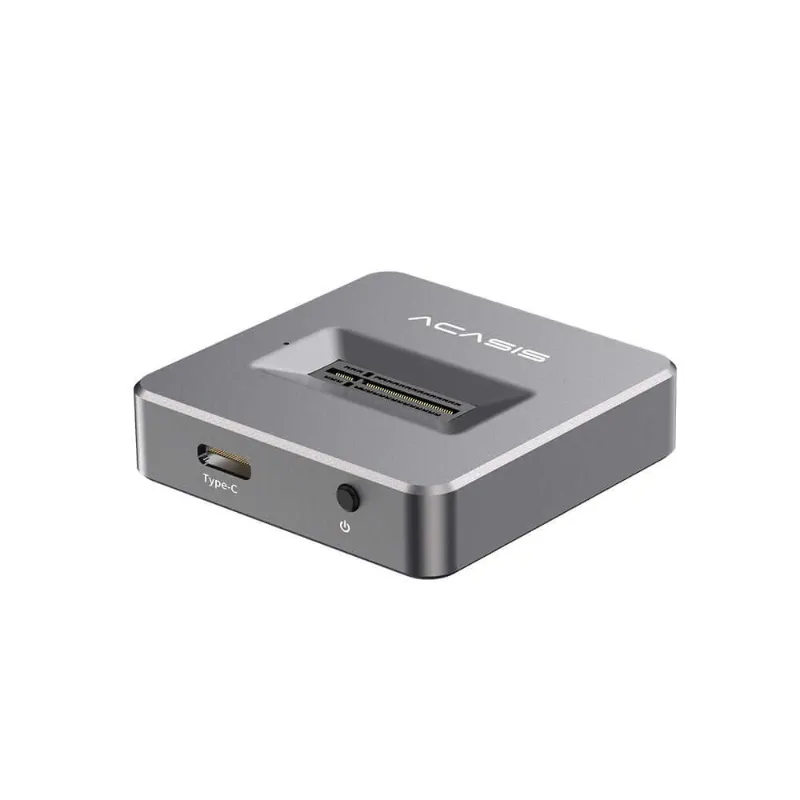
Choosing between sata ssd vs m.2 comes down to three things: the speed your workload actually needs, the slot your motherboard or laptop provides, and what enclosure or dock you plan to pair the drive with. Get those three right and you will not overpay for performance you cannot use, or underbuy and create a bottleneck.
What Actually Separates SATA SSDs from M.2 Drives
Both types live on a silicon chip, but they use different interfaces and connectors.
- SATA SSD uses the same AHCI protocol as a spinning hard drive, capped at roughly 550 MB/s sequential read. It plugs into a standard SATA data port and draws power separately.
- M.2 SATA fits the slim M.2 slot but still runs the SATA protocol, so speeds are identical to a 2.5-inch SATA SSD. The only gain is a smaller footprint.
- M.2 NVMe speaks the NVMe protocol over PCIe lanes. Gen 3 drives typically reach 3,500 MB/s read; Gen 4 and Gen 5 push even higher. This is the meaningful upgrade over SATA.
The confusion happens because "M.2" describes the physical form factor, not the protocol. Always check whether a drive is M.2 SATA or M.2 NVMe before buying.
SATA SSD vs M.2 NVMe: Head-to-Head Comparison
| Feature | SATA SSD | M.2 NVMe |
|---|---|---|
| Max sequential read | ~550 MB/s | 3,500+ MB/s |
| Interface | SATA / AHCI | PCIe / NVMe |
| Form factor | 2.5-inch or M.2 | M.2 (2230, 2242, 2280) |
| Heat output | Low | Moderate to high |
| Typical use case | Secondary storage, older systems | OS drive, creative workloads |
| Enclosure support | Standard USB enclosure | Needs NVMe-rated enclosure |
For everyday tasks like web browsing, documents, and media playback, SATA is fast enough. For 4K video editing, large game installs, or OS boot drives, NVMe makes a noticeable difference.
Picking the Right Enclosure for Each Drive Type
This is where most buyers trip up. Drop an NVMe drive into a cheap USB 3.0 enclosure and you lose most of the speed advantage. The enclosure bridge chip and cable standard must match the drive's potential.
For NVMe drives, the acasis 40gbps m.2 nvme ssd enclosure is built specifically to avoid that bottleneck. Running at 40 Gbps over Thunderbolt, it lets a fast Gen 4 NVMe drive actually stretch its legs as an external solution, which is ideal for video editors and developers who move large files between machines.
If you are working with a standard 2.5-inch SATA drive you pulled from an old laptop, an external hard drive enclosure handles the job cleanly. SATA speeds top out well below USB 3.2 Gen 2 limits, so a good-quality SATA enclosure is never the bottleneck.
Need an enclosure for m.2 ssd but are not sure which to grab? Match the enclosure's rated speed to the drive's protocol. M.2 SATA drives do not need a Thunderbolt enclosure. M.2 NVMe drives benefit enormously from one.
Connecting Your Drive to a Full Desk Setup
A fast SSD only helps if the rest of your peripherals keep up. That is where docking stations close the loop.
The acasis 11 ports thunderbolt 4 docking station is designed around exactly this workflow: connect your NVMe enclosure, displays, and peripherals through one Thunderbolt 4 cable to your laptop. You get the bandwidth headroom to run a fast drive and dual monitors simultaneously without congestion.
If your laptop runs USB-C rather than Thunderbolt, a laptop docking station dual monitor or a usb c docking solution still gives you the multi-monitor and multi-peripheral setup you need. Just note that USB-C docks share bandwidth across ports, so plug your SSD enclosure into the fastest port available.
For a more portable or desk-side hub, an acasis powered usb hub keeps your SATA enclosure, keyboard, mouse, and other accessories powered and connected from a single port. When desk space is tight and you need more ports than your laptop offers, a multiple usb port hub or usb splitter pc solution fills the gap.
Which Setup Suits Which User?
- Home or office user upgrading an older desktop or laptop: A SATA SSD dropped into an external hard drive enclosure is a cost-effective, plug-and-play upgrade.
- Creative professional or developer: An M.2 NVMe drive in the acasis 40gbps m.2 nvme ssd enclosure paired with a Thunderbolt dock delivers the sustained throughput you need.
- Streamer or capture workflow: Add a switch capture card into the mix and route everything through a dock so your capture device, NVMe scratch drive, and display all share one tidy cable run to your laptop.
- iPhone-centric mobile worker: Pair a compact NVMe enclosure with a phone docking station for iphone and a docking station laptop so your phone, laptop, and fast storage all charge and sync at one spot on your desk.
Where to Buy and How to Save
Acasis builds enclosures and docks specifically to match the bandwidth demands of modern NVMe and SATA drives, which is why their products come up repeatedly in this guide. Before you check out, grab the current Acasis discount code for 10% off your order. It stacks well if you are picking up both an enclosure and a dock at the same time.
For the most current pricing on individual products, check the latest deals at the Acasis store rather than relying on any number quoted here, since pricing changes regularly.
Quick Checklist Before You Buy
- Confirm whether your drive is M.2 SATA or M.2 NVMe (check the product page or the drive label).
- Match the enclosure to the protocol: NVMe drives deserve a Thunderbolt or USB4 enclosure.
- Decide whether you need a full dock for display and peripheral expansion or just a simple enclosure.
- Check your laptop's port: Thunderbolt 4, USB4, USB 3.2, or plain USB-C each have different bandwidth ceilings.
- Apply the Acasis discount code at checkout before you finalize the order.
Getting the enclosure and dock pairing right means the sata ssd vs m.2 decision actually plays out in real-world performance rather than on a spec sheet.
 Shopping at Acasis? See today's verified Acasis discount code
Frequently asked questions
Can I use an M.2 NVMe drive in a standard SATA enclosure?
No. A standard SATA enclosure uses the AHCI protocol and cannot communicate with an NVMe drive. You need an enclosure rated for NVMe, such as a Thunderbolt or USB4 model like the Acasis 40Gbps M.2 NVMe SSD enclosure, to get proper read and write performance.
What is the real speed difference between sata ssd vs m.2 NVMe in everyday use?
For daily tasks like browsing and office work, the difference is barely noticeable. Where NVMe pulls ahead is large file transfers, booting a full OS, and loading asset-heavy creative projects, tasks where sequential speeds matter most.
Will a Thunderbolt 4 dock bottleneck my NVMe enclosure?
A Thunderbolt 4 dock provides up to 40 Gbps of total bandwidth, so a single NVMe enclosure connected to it will not be significantly bottlenecked. Problems arise when you try to run multiple high-bandwidth devices simultaneously through the same dock port.
Does the Acasis 11 Ports Thunderbolt 4 Docking Station work with non-Apple laptops?
Thunderbolt 4 is an Intel-spec standard supported by many Windows laptops as well as Apple MacBooks. Check your laptop's spec sheet for Thunderbolt 4 or USB4 support before purchasing, and visit the product page for the full compatibility list.
Is there an Acasis discount code available right now?
Yes, The Planet Deals maintains a live Acasis coupon page with the current offer. Check the Acasis discount code page at /store/acasis-discount-code/ for the latest deal before checkout.
Can I connect both an SSD enclosure and a dual monitor to the same dock?
Yes, that is exactly the use case a Thunderbolt 4 dock is designed for. Models like the Acasis 11 Ports Thunderbolt 4 Docking Station provide dedicated display outputs alongside data ports, so your enclosure and monitors can run simultaneously without competing for bandwidth.