

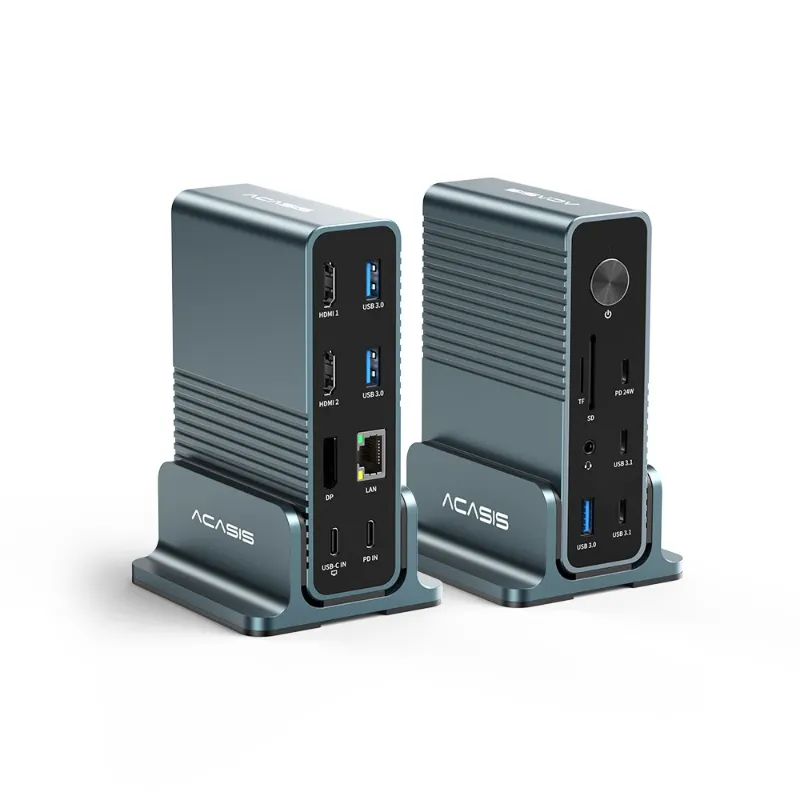
A laptop docking station dual monitor setup is the fastest way to turn a single-port laptop into a fully productive desktop workstation. The right dock feeds two external displays, charges your laptop, and consolidates every cable into one connection. This guide walks through the real decisions ACASIS buyers need to make before choosing a dock.
Why a Laptop Docking Station Dual Monitor Setup Changes Everything
Working across two screens is not just a comfort upgrade. Research from productivity studies consistently shows that extra screen real estate reduces window-switching time and helps maintain focus on complex tasks. The problem is that most modern laptops ship with one or two USB-C ports and expect you to do everything through them.
A good docking station laptop solution solves this by multiplying your connectivity from a single cable. You get:
- Dual display output without buying a separate adapter for each monitor
- Stable wired Ethernet instead of relying on Wi-Fi during video calls
- Simultaneous charging so your battery stays full while you work
- Expanded USB-A and USB-C ports for mice, keyboards, drives, and hubs
Thunderbolt 4 vs. USB-C: Which Interface Do You Actually Need?
This is the most important spec decision. Not all USB-C docks deliver the same bandwidth, and dual monitors demand real throughput.
| Feature | USB-C (USB 3.2) | Thunderbolt 4 |
|---|---|---|
| Max bandwidth | 20 Gbps | 40 Gbps |
| Dual 4K monitor support | Limited / varies | Yes, native |
| Daisy-chaining | No | Yes (up to 3 devices) |
| Laptop compatibility | Broad | Requires TB4/TB3 port |
If your laptop has a Thunderbolt 3 or Thunderbolt 4 port, the acasis 11 ports thunderbolt 4 docking station is the strongest option in the ACASIS lineup. Its 40 Gbps bus means both monitors get full bandwidth, fast storage runs without throttling, and your laptop charges at full speed simultaneously. If your machine only has standard USB-C, the usb c docking is the practical, budget-conscious pick that still handles dual display for most setups.
How to Check ACASIS Docking Station Compatibility Before You Buy
Before ordering, run through this quick checklist:
- Identify your laptop port. Look for the Thunderbolt logo (lightning bolt) or confirm USB-C generation in your laptop specs.
- Count your monitors' inputs. HDMI and DisplayPort both work, but confirm your dock has the right output ports for your screens.
- Check your laptop's display output support. Some ultrabooks cap external displays at one, regardless of the dock, due to GPU limits.
- Confirm power delivery wattage. A dock that delivers less power than your laptop charger will run down the battery under load.
ACASIS publishes compatibility notes on each product page. If you are still unsure, grab the current Acasis discount code and reach out to their support team before purchasing.
Expanding Ports: When a Dock Is Not Quite Enough
Sometimes a dock covers your monitors and Ethernet but leaves you short on USB-A slots for peripherals. That is where complementary ACASIS accessories close the gap.
The acasis powered usb hub adds multiple downstream ports without stealing bandwidth from your dock's upstream connection. For desktops or setups where you just need to split one USB port into several, the usb splitter pc is a compact, no-fuss option. And if your workstation runs out of USB slots entirely, a dedicated multiple usb port hub keeps everything accessible from one spot on your desk.
These accessories pair naturally with any ACASIS dock and are worth adding to your order while you are already checking the latest deal on the coupon page.
Fast Storage That Works Alongside Your Dock
A dual-monitor workstation often involves moving large files, editing video, or running virtual machines. Your dock's bandwidth headroom matters here too.
- The acasis 40gbps m.2 nvme ssd enclosure connects over Thunderbolt and delivers sequential speeds that rival internal drives, making it a genuine substitute for a desktop SSD.
- If you have a spare M.2 drive sitting unused, the enclosure for m.2 ssd is a simple way to put it to work as fast portable storage.
- For spinning-disk or 2.5-inch drives, the external hard drive enclosure adds reliable bulk storage without taking up a USB slot you need for something else.
Running a Thunderbolt 4 dock means all three of these can operate simultaneously at full speed alongside your dual monitors and charging, something a standard USB-C hub simply cannot guarantee.
Other ACASIS Accessories Worth Knowing About
ACASIS builds more than docks and enclosures. Two products worth noting for specific use cases:
- switch capture card: If you record or stream console gameplay, this plugs into a spare USB port on your dock and captures video without a dedicated capture PC.
- phone docking station for iphone: A clean charging and syncing stand that fits neatly alongside your laptop dock, keeping your iPhone charged and upright on the same desk.
Neither replaces the core dual-monitor workflow, but both show why ACASIS is worth bookmarking as a single source for desk peripherals.
Who Should Buy Which ACASIS Dock
Here is a quick summary to match buyer type to product:
| Buyer type | Best pick |
|---|---|
| Thunderbolt 4 laptop, power user | acasis 11 ports thunderbolt 4 docking station |
| Standard USB-C laptop, dual monitors | laptop docking station dual monitor |
| Tight desk, minimal peripherals | usb c docking |
| Need more USB slots alongside any dock | acasis powered usb hub |
Before you finalize your order, check the Acasis discount code page for the current 10% off offer. It applies store-wide, so it is worth stacking against whichever combination of dock and accessories fits your setup.
 Shopping at Acasis? See today's verified Acasis discount code
Frequently asked questions
Can I run two 4K monitors through a laptop docking station dual monitor setup?
Yes, but only if your laptop has a Thunderbolt 3 or Thunderbolt 4 port and you use a dock that explicitly supports dual 4K output. The ACASIS 11-port Thunderbolt 4 docking station is designed for exactly this use case, with 40 Gbps bandwidth to handle two 4K displays alongside data and charging.
Is the ACASIS Thunderbolt 4 docking station compatible with MacBooks and Windows laptops?
Thunderbolt 4 is cross-platform, so the ACASIS 11-port Thunderbolt 4 docking station works with both Apple Silicon MacBooks and Windows laptops that have a Thunderbolt 3 or Thunderbolt 4 port. Always verify your specific laptop model supports external multi-display output, as some models cap this in firmware.
What is the difference between the ACASIS USB-C docking station and the Thunderbolt 4 model?
The main differences are bandwidth and dual 4K support. The USB-C dock uses up to 20 Gbps and suits most dual-monitor setups at 1080p or 1440p, while the Thunderbolt 4 model runs at 40 Gbps and reliably supports dual 4K at 60Hz alongside high-speed storage.
Does ACASIS offer a discount code or free shipping?
ACASIS does run discount codes and periodic promotions. Check the ACASIS coupon page on our site for the current offer, including any free shipping threshold, before you complete your order.
Can I connect an ACASIS SSD enclosure and dual monitors to the same Thunderbolt 4 dock at the same time?
Yes. The 40 Gbps bandwidth of a Thunderbolt 4 dock is specifically designed to handle simultaneous display output, fast storage, and charging without bottlenecking any single connection. The ACASIS 40Gbps M.2 NVMe SSD enclosure is built for exactly this kind of multi-device Thunderbolt chain.
What should I do if my laptop only has USB-A ports and no USB-C?
A traditional USB-A laptop cannot use a USB-C or Thunderbolt dock directly. Your best options are a USB-A powered hub for port expansion or an adapter, though dual 4K monitor output will not be achievable without a DisplayPort or HDMI connection from the laptop itself.