

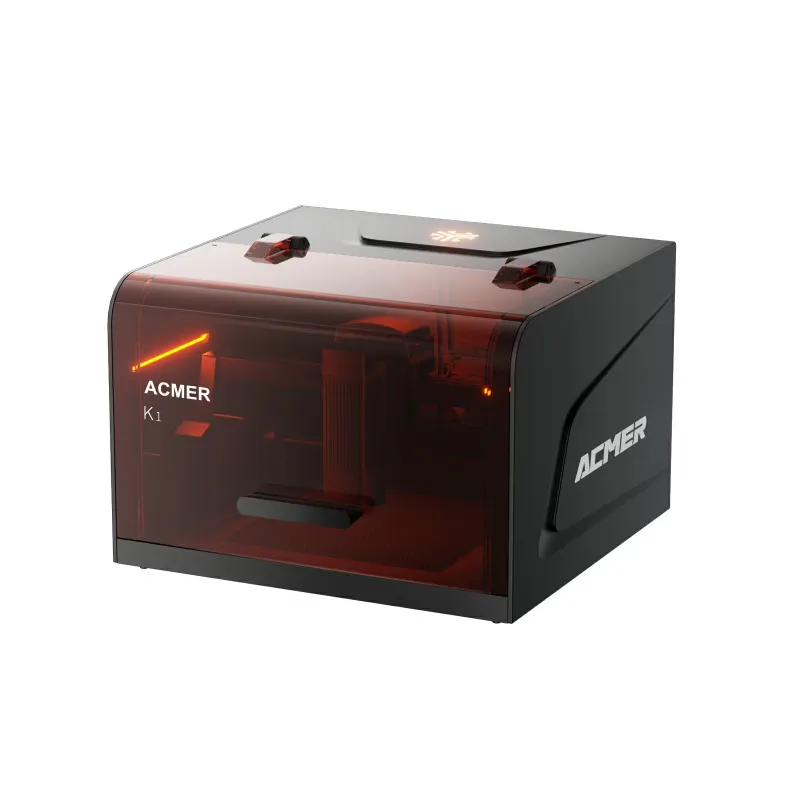
If you are comparing the acmer k1 laser engraver lineup or deciding between the acmer p2 laser engraver and the acmer p3 48w laser cutter, the choice hinges on power output, working area, and the materials you plan to cut or engrave. The P2 delivers solid performance for hobbyists and small workshops, while the P3 steps up with higher wattage and a larger bed for heavier production runs. We tested both machines across wood, acrylic, leather, and layered plywood to help you decide which one belongs on your bench.
Power and Speed: Where the P2 and P3 Differ
The P2 runs a 20W diode laser module, which handles engraving on wood, leather, cardboard, and thin acrylic at respectable speeds. Cutting through 3 mm plywood typically takes two to three passes at moderate feed rates. The acmer p3 48w laser cutter, on the other hand, doubles the wattage and slices through 5 mm birch plywood in a single pass. If you are engraving fine text or intricate vector designs, both machines perform well, but the P3 finishes jobs faster and leaves cleaner edges on thicker stock.
For workshops that prioritize throughput or regularly cut denser hardwoods, the P3 justifies the upgrade. Hobbyists working with thinner materials or smaller batches will find the P2 more than adequate. Check the latest price to see how the current 10% OFF sitewide discount affects your budget.
Work Area and Build Quality
- P2 working area: 400 × 400 mm, suitable for small signs, coasters, phone cases, and personalized gifts.
- P3 working area: 600 × 400 mm, accommodating larger panels, multi-item batch layouts, and full-sheet cutting.
- Both frames use aluminum extrusion with tensioned belts and linear rails for consistent motion control.
- The P3 adds reinforced Y-axis gantry supports to handle the extra weight and vibration at higher speeds.
If your projects regularly exceed 400 mm in width, the P3 saves you from tiling or repositioning. The P2 fits tighter workspaces and benchtops where every centimeter counts.
Material Compatibility Across the Range
Both the P2 and P3 handle the same material palette, but thickness and speed vary:
| Material | P2 Performance | P3 Performance |
|---|---|---|
| Basswood 3 mm | Clean cuts, 2 passes, 8 mm/s | Single pass, 15 mm/s |
| Acrylic 3 mm | Engraves well, cuts slowly | Fast cuts, minimal edge polish |
| Leather 2 mm | Sharp detail, no charring | Sharp detail, faster throughput |
| Cork 5 mm | Requires 3+ passes | 1-2 passes, cleaner edges |
Neither machine cuts metal directly. If you need metal marking or deep engraving on stainless steel, aluminum, or brass, consider the acmer mopa fiber laser auto-focus marking machine instead. For wood, acrylic, leather, fabric, and paper, both the P2 and P3 deliver professional results.
Software, Connectivity, and Ease of Setup
Acmer ships both models with LightBurn-compatible firmware, so you can use the same design workflow across machines. The P2 and P3 connect via USB or Wi-Fi, and both support SD card offline operation once you have dialed in your settings. Initial assembly takes about 30 minutes: mount the gantry, tension the belts, square the frame with a carpenter's square, and run the included test file.
- Autofocus: Neither model includes hardware autofocus. You will adjust Z-height manually using a spacer block or feeler gauge.
- Air assist: Both machines feature integrated air-assist nozzles. Connect a small aquarium pump or dedicated air compressor to reduce smoke and improve edge quality.
- Safety: Acrylic lid and emergency stop button come standard. Always wear laser safety glasses rated for your wavelength.
The learning curve is gentle. If you have used any gantry-style CNC or 3D printer, the workflow feels familiar.
Who Should Choose the P2, and Who Needs the P3
Pick the P2 if:
- You engrave more than you cut, especially on materials under 3 mm.
- Your workspace is limited and you rarely need panels wider than 400 mm.
- Budget is a priority and you want solid performance without the power premium.
Pick the P3 if:
- You cut production runs of signs, panels, or layered assemblies.
- Speed matters: the 48W module nearly doubles throughput on thick stock.
- You plan to scale up or take on client work that demands larger formats.
The acmer p2 laser engraver suits makers, Etsy sellers, and weekend hobbyists. The acmer p3 48w laser cutter fits small businesses, prototyping labs, and anyone who values time savings over initial cost. Grab the code to lock in the current sitewide discount before your next project deadline.
Running Costs and Maintenance
Diode laser modules last 8,000 to 10,000 hours under typical use. Replacement modules for both the P2 and P3 are available directly from Acmer, and swapping one takes about 15 minutes with an Allen key and a small screwdriver. Consumables include:
- Honeycomb cutting beds: replace when charring affects workpiece flatness, usually every 200 to 300 hours of cutting.
- Air-assist tubing and nozzle tips: clean weekly, replace if clogged or damaged.
- Lens and mirror cleaning: use isopropyl alcohol and lint-free wipes every 20 hours of operation to maintain beam quality.
Both machines draw similar idle power and ramp up under load. The P3 pulls slightly more current at full power, but the difference is negligible for home workshop circuits. Neither machine requires specialized ventilation beyond a standard fume extractor or open-window setup with a inline fan.
Final Recommendation
The P2 and P3 both deliver reliable cutting and engraving across wood, acrylic, and leather, but the right choice depends on your production volume and material thickness. The P2 excels in compact workshops and lighter-duty projects, while the P3 justifies its premium with faster cuts, a wider bed, and the headroom to grow with your business. If you are still exploring the Acmer lineup, the acmer k1 laser engraver offers an entry-level alternative with a smaller footprint, and the fiber option handles metal marking that diode lasers cannot touch. For current pricing on the P2 and P3, check the latest deals and apply the 10% OFF code at checkout.
 Shopping at Ru Acmer? See today's verified Ru Acmer discount code
Frequently asked questions
Can the Acmer P2 cut through 5 mm plywood in one pass?
No, the P2's 20W diode typically requires two to three passes for 5 mm plywood. The P3's 48W module handles that thickness in a single pass with cleaner edges.
Do I need different software for the P2 versus the P3?
No, both machines use LightBurn-compatible firmware and share the same design workflow. You can switch between machines without learning new software.
Which Acmer laser engraver is better for small Etsy shops?
The P2 suits small-batch engraving and lighter materials, while the P3 is better if you cut thicker stock or run higher volumes. Budget and material thickness are the deciding factors.
Can either the P2 or P3 engrave metal directly?
No, both use diode lasers that cannot cut or deeply engrave bare metal. For metal marking, the Acmer MOPA fiber laser is the correct tool.
How long do the laser modules last on the P2 and P3?
Diode modules typically last 8,000 to 10,000 hours under normal use. Replacement modules are available from Acmer and take about 15 minutes to swap.
What is the actual working area difference between the P2 and P3?
The P2 offers 400 × 400 mm, while the P3 provides 600 × 400 mm. The P3's extra width accommodates larger panels and multi-item batch layouts.