
Adding a Front Facing Camera to Your Car: Installation and Compatibility Guide

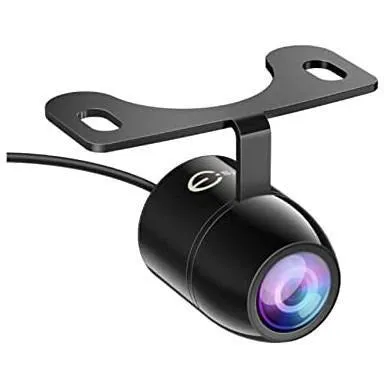
Why Add a Front Facing Camera to Your Vehicle
A front facing camera gives you a clear view of the road directly ahead of your bumper, eliminating blind spots when parking, navigating tight spaces, or merging into traffic. Unlike rear cameras that became standard in most vehicles, front-mounted dash cameras capture obstacles below your sightline, curbs, low barriers, and pedestrians that might otherwise go unseen. We tested several aftermarket front camera solutions and found that installation difficulty and display compatibility vary widely depending on your vehicle's existing infotainment setup.
Most modern implementations require a display interface to show the camera feed. If your car supports Apple CarPlay or Android Auto, you already have the screen real estate needed. Pairing a front facing camera with a wireless carplay adapter or carplay ai box creates a unified system where your camera feed, navigation, and apps share one dashboard display.
Choosing the Right Camera Hardware
Not all front cameras deliver the same image quality or mounting flexibility. Look for these specifications when comparing options:
- Resolution: 1080p minimum for clear curb detection; 4K models capture license plates and road markings in detail
- Field of view: 120 to 170 degrees covers the full width of your hood without fisheye distortion
- Night vision: infrared or low-light sensors ensure visibility in parking garages and at dusk
- Weatherproofing: IP67 or IP68 rating protects against rain, snow, and car washes
- Power input: 12V DC compatibility with your vehicle's accessory circuit
We recommend checking the latest price on camera models that include a dedicated trigger wire. This wire activates the feed automatically when you shift into drive or reverse, so you do not need to manually toggle the view every time you park.
Installation Steps and Mounting Locations
Professional installation typically costs between $100 and $200, but the process is straightforward if you are comfortable routing cables through your dashboard. Here is how we approach it:
- Select a mounting point: the front grille, below the license plate, or behind the logo panel all work well; avoid locations that block airflow to the radiator
- Run power from the fuse box: tap into an accessory fuse (not a constant 12V line) so the camera powers on with ignition
- Route the video cable: snake it through the firewall grommet or along existing wiring harnesses to reach your head unit
- Connect to your display: if your infotainment supports AV input, plug directly; otherwise, an adapter box converts the signal for CarPlay or Android Auto integration
- Secure and test: zip-tie cables away from moving parts, then verify the feed activates when you engage the parking brake or shift gears
A camera front camera setup with a dedicated monitor bypasses your existing head unit entirely. This approach works for older vehicles without touchscreen displays, but it adds a second screen to your dashboard.
Integrating With CarPlay and Infotainment Systems
CarPlay does not natively support live camera feeds through the standard Apple interface, so aftermarket boxes bridge the gap. A carplay ai box runs Android apps alongside CarPlay, letting you display your front camera feed in a split-screen or pop-up window. Alternatively, some wireless carplay dongle models include a dedicated camera input port that overlays the video on top of your CarPlay screen when triggered.
If your factory head unit has an auxiliary video input (often labeled "AUX" or "Camera 2"), you can connect the front camera directly. Most systems designed for rear cameras accept a second input for front-mounted units. Check your owner's manual for the pinout or consult a wiring compatibility reference to identify which RCA or composite connection your system uses.
For Tesla owners, the carplay tesla adapter routes both CarPlay and camera signals through the center touchscreen. This requires a firmware-compatible adapter and occasionally a custom harness, so verify model-year support before purchasing.
Cable and Power Requirements
Video signal quality degrades over long cable runs, especially with analog composite cables. Keep these guidelines in mind:
- Use shielded RCA cables for runs longer than 10 feet to prevent interference from the alternator and ignition system
- Match your head unit's input: newer systems accept HDMI or LVDS; older units require composite or S-video
- Separate power and signal lines by at least six inches to avoid electrical noise in the video feed
If you are upgrading your entire infotainment setup, pair your front camera with an apple carplay cable or wireless carplay adapter that supports high-definition video pass-through. These adapters maintain 1080p resolution for both your phone's interface and the camera feed. You can grab the code to save on bundles that include both the camera and the CarPlay hardware.
Compatibility With Existing Systems
Most aftermarket head units from Pioneer, Kenwood, Alpine, and Sony include a front camera input alongside the standard rear camera port. Factory systems in vehicles manufactured after 2018 often support dual-camera setups through the OEM parts catalog, though pricing can be steep.
Before purchasing a front facing camera for car applications, confirm three details:
- Does your head unit have an available video input, or will you need an adapter box?
- Can your system trigger the camera feed automatically, or will you toggle it manually via a button?
- Does the camera's voltage match your vehicle's electrical system (12V for cars, 24V for some trucks)?
Android-based head units offer the most flexibility. Since they run a full operating system, you can install third-party camera apps that record footage, adjust brightness, and display parking guidelines overlaid on the live feed. An apple certified cable for carplay ensures stable data transfer if you switch between CarPlay mode and the camera app frequently.
Troubleshooting Common Installation Issues
We encounter these problems regularly and here is how to solve them:
- No video signal: verify the camera's power LED is lit; check that the video cable is seated firmly in both the camera and head unit
- Image flickers or has horizontal lines: reroute the video cable away from the alternator, spark plug wires, and high-current power lines
- Feed does not activate automatically: connect the camera's trigger wire to your reverse light circuit or parking brake signal, depending on when you want the view to appear
- Picture is upside down or mirrored: access your head unit's camera settings menu and toggle the flip or mirror option
For persistent interference, add a ground loop isolator between the camera and the display. This $10 component eliminates the hum and static caused by voltage differences between the camera's ground and the head unit's chassis ground.
If you are working with a wireless carplay setup, latency can delay the camera feed by 200 to 500 milliseconds. For real-time parking assistance, a wired connection to the display remains more reliable.
Who Benefits Most From a Front Camera
Front-mounted cameras suit drivers who frequently navigate:
- Urban parking: tight parallel spots where curbs and poles hide below your hood line
- Off-road trails: rocks, stumps, and ruts directly ahead of your front axle
- Low-clearance driveways: steep inclines or parking garage ramps that risk scraping your bumper
- Wide vehicles: trucks, SUVs, and vans where the driver sits far behind the front bumper
If you haul trailers or drive a vehicle with a long hood, a front camera reduces guesswork when aligning your hitch or approaching loading docks. Pair it with a carplay usb connection for a clutter-free install that keeps your dashboard organized.
We also recommend front cameras for new drivers and those with mobility limitations who benefit from an extra set of visual cues. The real-time feed builds confidence in tight maneuvering situations where spatial awareness is critical.
Frequently asked questions
Can I install a front facing camera without professional help?
Yes, if you are comfortable routing cables and tapping into your vehicle's fuse box. The process involves mounting the camera, running power and video lines, and connecting to your display. Most installations take two to four hours for a first-timer.
Does a front camera work with factory CarPlay systems?
Factory CarPlay does not natively display live camera feeds, but aftermarket AI boxes and wireless adapters can overlay the video on your screen. Some newer vehicles support front camera input through the OEM parts catalog.
What resolution should I choose for a car front camera?
1080p provides clear detail for parking and obstacle detection. 4K models capture finer details like license plates and road markings but require more expensive display hardware to show the full resolution.
Will a front camera drain my car battery when parked?
Not if wired correctly. Connect the camera to an accessory fuse that only powers on with ignition, not a constant 12V line. This ensures the camera shuts off when you remove the key.
Can I use the same display for front and rear cameras?
Yes, most aftermarket head units and camera-capable infotainment systems support dual inputs. You can toggle between front and rear views or configure automatic switching based on gear selection.
How do I reduce video interference in my front camera feed?
Use shielded RCA or coaxial cables, route them away from high-current wires, and install a ground loop isolator if you see static or horizontal lines. Proper grounding at both the camera and display also prevents noise.