

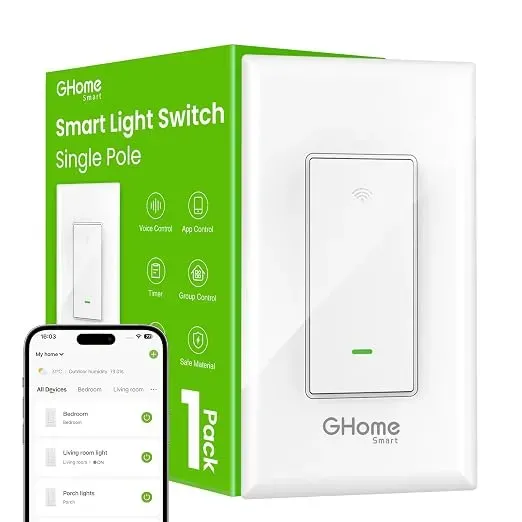
A GHome smart light switch will not work without a neutral wire in most cases, so before you order the 3 way smart switch, check the wall box behind your existing switch for a bundle of white wires. If you have one, you are in good shape. If you do not, you still have options, and this guide walks through all of them.
We look at the whole GHome Smart line, not just switches, because the neutral question is usually the moment a simple upgrade turns into a bigger project. Get the wiring sorted first and the rest, from pairing to voice assistant support, goes quickly.
What a neutral wire does, and why smart switches want one
An old-school toggle switch only interrupts the hot wire. It needs no power of its own, so the two wires in the box are usually live and switched-live. That is it.
A smart switch is a small computer. It has a radio, a chip, and often a dimming relay, and it needs a continuous trickle of power to stay awake and connected to your network. That continuous path runs through the neutral. Without it, the switch cannot close the circuit on its own, and the lights either stay dead or flicker as the device tries to steal power through the load.
So the short version: hot in, load out, and neutral to complete the loop. Three connections plus ground.
Does the GHome 3 Way Smart Switch need a neutral wire?
Yes for the standard models. GHome designs its smart switches for boxes that already have a neutral, and the product listing states that requirement, so read it before you add anything to a cart. The 3 way smart switch and the smart three way switch are built for travelers-and-load setups where two switch locations control the same fixture, and each location needs the same basic wiring done correctly.
A few things that trip people up:
- A white wire is not automatically neutral. In older 3 way wiring, white is sometimes used as a traveler. Test, do not assume.
- Neutral in one box does not mean neutral in both. In a 3 way pair, the second location may have no neutral at all.
- Confirm the model. Neutral requirements differ between single-pole and 3 way versions, so match the exact SKU to your setup.
The good news is that checking takes five minutes with a screwdriver and a non-contact tester.
How to check your switch box for a neutral (wiring requirements)
Turn the breaker off first. Not "probably off" off. Verify with a tester at the switch.
- Remove the cover plate and unscrew the switch from the box.
- Look at the back of the box for a bundle of white wires capped with a wire nut and tucked away from the switch. That bundle is almost always the neutral.
- If you only see two or three wires plus a bare ground attached to the switch, and no capped white bundle, you likely have no neutral.
- Count the wires. Two (plus ground) means single-pole. Three or four travelers in one sheath means 3 way.
- Snap a photo of the wiring before you disconnect anything. It saves real arguments later.
If the box is packed tight, has cloth-insulated wiring, or you see anything scorched, stop and call an electrician. A smart switch is not worth a house fire.
No neutral? Your realistic options
You are not stuck. The workaround depends on whether you need dimming, 3 way control, or just remote control.
| Option | Needs neutral? | Best for |
|---|---|---|
| GHome 3 way smart switch | Yes | Boxes with a capped white bundle |
| No-neutral smart switch (2-wire) | No | Older homes, single-pole only |
| Smart bulbs plus existing switch | No | Renters and quick installs |
| Smart plug or power strip | No | Lamps and small appliances |
A smart power strips setup is the least invasive fix if the goal is scheduling and remote control rather than wall-switch control. You keep the dumb switch, plug the lamp into the strip, and control it from the app. Nothing gets rewired.
No-neutral switches exist, but most of them only work in single-pole setups and some need a minimum load to function. They rarely support a true 3 way circuit, which is exactly where people get burned.
3 way wiring, install, and app setup
If you do have neutrals at both locations, plan the install around one switch at a time.
- Identify the line (incoming hot), the load (to the fixture), and the travelers between the two boxes.
- Label each traveler before you disconnect it.
- Install the switch that GHome designates as the master first, then the add-on or second unit.
- Match the traveler terminals exactly as the diagram shows. Swapping them is the number one cause of "the second switch does nothing."
- Restore power and test both locations before you mount anything into the wall.
Then move to the app. Pair the switch on 2.4 GHz, name it, assign it to a room, and set the three-way behaviour so both locations report the right state. Voice assistant support is a checkbox after that: Google Home and Alexa both pick the device up once the account is linked, and the light switch google setup works the same way with the same naming rules. Keep device names short and distinct ("Kitchen Ceiling" not "Light 1") or your voice commands will fight each other.
Budget 20 minutes for one switch and an hour for a 3 way pair if it is your first time.
Where the rest of the GHome lineup fills the gaps
The neutral wire question only applies to switches that sit in a wall. Everything else in the lineup is battery or plug powered, which makes it a smart way to get most of the benefit with none of the wiring risk.
- A wifi door sensor or Tuya door sensor covers entry alerts and automations without touching your electrical.
- A smart power strip or surge strip handles lamps, fans, and small appliances.
- A thermometer with app gives you schedules and scenes that reference temperature.
- A smart door lock handles access, and smart lock compatibility with your hub is worth checking before buying.
That mix is how you build a house that responds without rewiring a single box. Sensor pairing tips apply here too: pair close to the hub, name as you go, and test each automation before adding the next.
Who this suits and what to buy first
The 3 way smart switch is the right purchase if your switch boxes already have neutrals and you want scheduling, scenes, and voice control on a light that two switches control. That is a large share of homes built or rewired in the last 30 years, so it is not a niche product.
Skip it, or plan around it, if:
- Both switch locations lack a neutral.
- The wiring is aluminium, cloth-covered, or you cannot identify the travelers.
- You rent and cannot modify the electrical.
Start with one switch before committing to a full house. Check the current offer and grab the code for 10% off all orders, and if you are still deciding between the standard and the multi-location version, check the latest price on the store page rather than guessing at what a bundle costs.
If your wiring is confirmed and you are ready to move, the 3 way smart switch is the direct starting point. Wiring is the one part of a smart home you cannot undo with an app, so get it right once, then enjoy the automations.
 Shopping at GHome Smart? See today's verified GHome Smart discount code
Frequently asked questions
Can a 3 way smart switch work with only two wires in the box?
Not the standard GHome models. The switch needs a neutral to keep its radio powered, so a two-wire box will not support it. Your choices are a no-neutral switch, smart bulbs, or a smart plug for that fixture.
Is a white wire in a 3 way switch box always the neutral?
No. In many older three-way circuits the white wire is used as a traveler between the two switches. Test with a non-contact tester rather than assuming, and look for a capped bundle of white wires that is not connected to the switch.
Do I need a neutral wire at both switches in a 3 way setup?
In most cases yes, because both switch locations need power for the radio. Check both boxes before buying. If only one has a neutral, an electrician can sometimes pull one, but that is a job for a pro.
Does the GHome switch work with Google Home and Alexa?
Yes, once you link the GHome account in the assistant app and pair the switch on a 2.4 GHz network. Keep device names short and unique so voice commands do not clash between rooms.
What if my home has no neutral wires anywhere?
Then skip wall switches and build the setup from plug-in and battery devices instead: a smart power strip for lamps, wifi door sensors for entries, and a smart thermometer for scheduling. None of those touch your electrical wiring.
How do I get the GHome discount code?
It is on our store page, along with the current offer of 10% off all orders. Check that page for the latest price and shipping and returns details before you order.