
How to Choose the Best Dell Chromebook for Your Budget

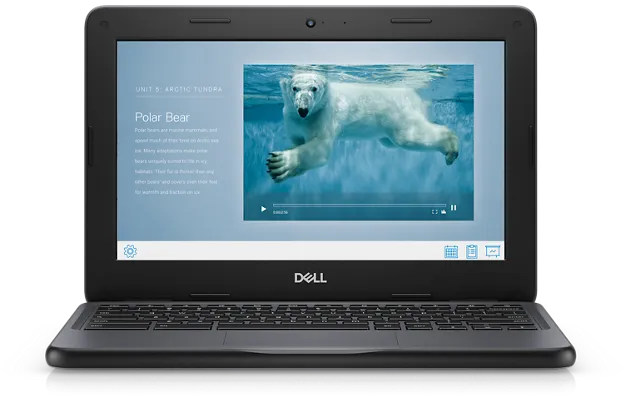
The best Dell Chromebook for your budget is the one whose dell chromebook specifications match how you actually use it, and for most people that means a Dell 3100 at the low end, a Dell 3400 or an i3 model in the middle, and a 2-in-1 only if you truly need the touchscreen. Spend less than that on specs you will never use, and more only when a specific feature earns it. Here is how to make that call without guessing.
Dell Chromebook Specifications That Actually Matter
Chromebook spec sheets are shorter than Windows laptop ones, but a few lines decide everything. When you compare any chromebook laptop, check these in order:
- Processor. Celeron chips (like the N4020 in the Dell 3100) handle browsing, docs, and video calls fine. An Intel Core i3, found in some higher-spec units, adds headroom for many browser tabs and light Linux apps.
- RAM. 4GB is workable for one or two tasks. 8GB is the comfort zone for school or work use in 2024 and beyond.
- Screen size. 11.6 inch models like the dell 11.6 chromebook are lighter and cheaper; 14 inch models like the Dell 3400 are easier on the eyes for long sessions.
- Storage. 16GB eMMC is common on older and budget units. It fills fast if you store files locally, so plan on cloud storage or pay for 32GB or more.
- Build and ruggedization. Education models have spill-resistant keyboards, rubberized edges, and tougher hinges. That matters more than specs if the laptop rides in a backpack every day.
- Battery life. Most Dell Chromebooks in this range promise a full school day, but older batteries in refurbished units may not.
If you want the manufacturer's own numbers for any of this, Dell publishes the full Dell Chromebook 3100 Setup and Specifications manual online, and it is the best source for exact weights, ports, and wireless standards.
Which Dell Chromebook Fits Each Budget
Here is the honest breakdown we give friends and family who ask us which model to buy:
| Budget level | Model to look at | Why it fits |
|---|---|---|
| Lowest | dell 3100 | Rugged education build, solid Celeron performance, the cheapest current-generation option that is still pleasant to use |
| Low to mid | dell 11.6 chromebook | Same compact size class with different configuration and condition options, good when portability is the priority |
| Mid | dell chromebook 3400 | Larger 14 inch screen and a more comfortable typing experience for daily, all-day use |
| Mid with power | dell chromebook i3 | The Core i3 upgrade for multitaskers who keep many tabs open |
| Flexible | chromebook 3100 2 in 1 | Touchscreen and convertible hinge for media, drawing, and tablet-style use |
The dell 3100 is our default recommendation for students, and for good reason: the dell chromebook 3100 review consensus (ours included) is that it takes abuse well and performs consistently for classroom work. If you are comparing configurations, the listed dell chromebook 3100 specs and the dell chromebook 11 specs vary by unit, so always read the specific listing rather than assuming.
Where the Dell -11-cc11260-11-6- Chromebook Fits
Smaller and older units like the dell -11-cc11260-11-6- chromebook sit at the very bottom of the price ladder. These compact 11.6 inch machines are genuine bargains if your workload is light: email, Google Docs, streaming, and video calls. Two caveats before you buy one as your cheapest chromebook:
- Check the listed RAM. 4GB is fine for light use, but do not expect smooth multitasking with a dozen tabs.
- Check the auto update expiration. Older Chromebooks stop receiving OS updates sooner, which is the single biggest hidden cost of buying too far down the ladder.
For context on how Dell's small Chromebooks have evolved over the years, Dell Chromebook 11 3180 - Specs, Tests, and Prices is a useful reference for what those earlier generations offered and how pricing moved.
Should You Buy New or a Dell Chromebook Old?
A dell chromebook old, meaning a refurbished or off-lease education unit, is often the smartest budget buy. Schools refresh fleets every few years, so lightly used 3100s and similar models hit the market at a fraction of their original price. We buy refurbished constantly and recommend it, with three checks first:
- Grade and condition. Reputable sellers grade cosmetics and disclose battery health. Grade A or B is usually worth the small premium over C.
- Update window remaining. Every Chromebook has a limited update period from its release date. Ask how many years are left before you commit.
- Return policy. Refurbished units occasionally arrive with quirks. A 30 day return window turns that risk into a non-issue.
If you need several machines at once, for a family, a classroom, or a small team, buying bulk computers from the same refurbished stock is usually cheaper per unit than buying individually, and the seller can confirm the units are from the same batch and configuration.
How to Pay Less on Top of Choosing Right
Choosing the right model saves more than any coupon, but stacking both is the goal. Before you check out on anything above, check the latest price on our Chromebooks R Us code page, where we post the current offer on all orders. We keep that page updated whenever the discount changes, so it is worth a look even if you have bought from the store before.
The Bottom Line
Match the machine to the work. A dell 3100 covers most students, the 3400 or an i3 unit covers heavier daily use, and a well-vetted refurbished unit beats an overpriced new one almost every time. Read the exact specifications on the listing, verify the remaining update window, and grab the code before you pay. Do those four things and you will get a chromebook laptop that feels like it cost more than it did.
Frequently asked questions
Which Dell Chromebook is best for students on a tight budget?
For most students and everyday browsing, the Dell 3100 is the best value. It has a rugged education build and enough performance for Google Docs, video calls, and streaming without paying for power you will not use.
What dell chromebook specifications should I check before buying?
Key dell chromebook specifications are the processor, RAM, storage, screen size, remaining OS update window, and whether the unit has the rugged education build. Always check the exact listing rather than assuming all units of a model are identical.
Is a refurbished or older Dell Chromebook worth buying?
Yes, if you verify the cosmetic grade, battery condition, return policy, and how many years of Chrome OS updates remain. Lightly used off-lease education units like the Dell 3100 are often the best value in the entire Chromebook market.
What is the difference between the Dell 3100 and the Dell 3400?
The Dell 3100 is a compact 11.6 inch education model focused on durability, while the Dell 3400 has a larger 14 inch screen that is more comfortable for long work sessions. Choose the 3100 for portability and toughness, the 3400 for screen real estate.
Do I need a Dell Chromebook with an Intel Core i3?
The Core i3 adds noticeable headroom for heavy multitasking, many open tabs, and light Linux apps. If you mostly browse and use Google Docs, a Celeron model will do the job for less.
How do I get a discount on a Dell Chromebook?
Check our Chromebooks R Us discount code page for the current offer before you check out. Buying refurbished units, and buying in bulk when you need several machines, also lowers the per-unit cost.