
Are Dell Chromebooks Good for Students? A Buyer's Guide

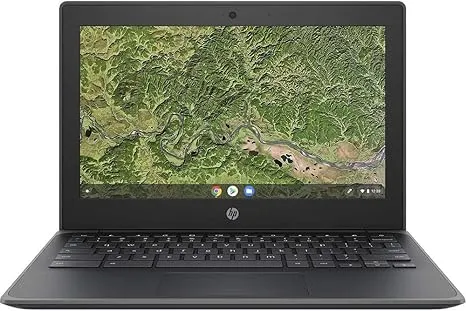
Yes, Dell Chromebooks are a solid choice for students, and the Dell Chromebook 3100 series is our top pick for most school workloads. In this guide we break down the dell chromebook specifications that actually matter for homework, Google Classroom, and all-day battery life, then compare the models we recommend so you can pick the right one without overpaying.
Why We Recommend Dell Chromebooks for Students
Dell has built education-focused Chromebooks for over a decade, and that experience shows in the details. Spill-resistant keyboards, reinforced hinges, and rubberized edges are standard on the education models, which matters when a laptop gets stuffed into a backpack every morning.
The other big win is ChromeOS itself. Boot times are measured in seconds, updates happen in the background, and malware is largely a non-issue. For a student who mainly needs Google Docs, Slides, web research, and video calls, a ChromeOS machine covers nearly everything. If you want to browse the full lineup, start with our chromebook laptop category and filter from there.
Dell Chromebook Specifications That Actually Matter
When you compare the dell chromebook specifications on a listing page, it is easy to get lost in model numbers. These are the specs worth checking first:
- Processor: Celeron N4000/N4020 and N4120 chips handle schoolwork fine. If your student runs many tabs or Android apps, step up to a dell chromebook i3, which feels noticeably snappier.
- RAM: 4GB is the floor; 8GB is the comfortable choice for multitasking.
- Storage: 16GB to 32GB eMMC is typical. ChromeOS leans on cloud storage, so this is less critical than on a Windows laptop.
- Screen size: 11.6-inch screens keep weight down; 13.3 and 14-inch screens are easier on the eyes for long reading sessions.
- Battery: Look for models rated for a full school day, around 10 hours or more.
- Durability: Education models meet MIL-STD drop and spill testing, a Dell staple.
For the deep technical detail, Dell publishes the full Dell Chromebook 3100 Setup and Specifications manual online, and we recommend checking it before buying any specific configuration.
Our Top Dell Picks: Model Comparison
Here is how the Dell models we stock most often stack up for students:
| Model | Best for | Screen | Why we like it |
|---|---|---|---|
| dell 3100 | Most students | 11.6" | Rugged, cheap, all-day battery |
| chromebook 3100 2 in 1 | Note-taking and drawing | 11.6" touch | Converts to tablet, stylus support |
| dell chromebook 3400 | Older students | 11.6" | Slightly newer platform, solid keyboard |
| dell -11-cc11260-11-6- chromebook | Tight budgets | 11.6" | Ultra-portable backup or first laptop |
The dell chromebook 3100 specs are the ones we get asked about most in our dell chromebook 3100 review questions from readers: Celeron processor, 4GB or 8GB RAM, 16GB to 32GB storage, and roughly 10+ hours of battery. It is not exciting, but it is dependable, and a clean, tested unit is the cheapest chromebook path we recommend for elementary and middle school.
2-in-1 vs Clamshell: Which Should a Student Get?
The dell chromebook 3100 2-in-1 has a 360-degree hinge, so it works as a laptop for typing and a tablet for reading or annotating PDFs. That flexibility is genuinely useful for humanities classes where highlight-and-annotate is a daily task.
The tradeoffs:
- 2-in-1 pros: Touchscreen, tablet mode for reading, stylus support on some units.
- 2-in-1 cons: A bit heavier, hinge adds a potential failure point, usually costs more.
- Clamshell pros: Simpler, often cheaper, feels sturdier for all-day typing.
Our rule of thumb: clamshell for grades 3 through 8, 2-in-1 for high school and college students who take digital notes.
Should You Buy New or a Refurbished Dell Chromebook?
We test refurbished units constantly, and for education Dell models the answer is usually: buy refurbished. School districts retire these laptops in large lots, so certified units arrive with low use hours and rugged housings that were built to survive kids in the first place.
A dell chromebook old listing is where the best value hides. Models like the Chromebook 11 3120 still handle Google Docs and web browsing fine; independent testing of the era's hardware is documented in the Dell Chromebook 11 3120 - Specs, Tests, and Prices series if you want the background. Just check two things before buying used:
- Auto Update Expiration (AUE): ChromeOS devices stop receiving security updates after a set date. Avoid anything with less than two years of updates remaining.
- Battery condition: Ask whether the battery has been tested or replaced.
Buying several for siblings or a classroom? Our bulk computers category is set up for exactly that, with pricing that improves at quantity.
Dell vs HP Chromebooks for School
Dell is not the only education brand. The hp chromebook 11 g8 ee is HP's direct rival to the 3100: similar 11.6-inch rugged build, similar Celeron specs, similar price tier. In our hands, the differences come down to feel rather than performance:
- Dell keyboards tend to be slightly more spill-proof, and part availability for education models is excellent.
- HP units are sometimes a touch lighter, and the G8 EE's hinge feels equally confidence-inspiring.
Both are good. Pick whichever configuration (RAM, storage, condition) is the better deal that day, and you will not regret either.
How to Pay Less for a Student Chromebook
Two habits save our readers the most money. First, buy the certified used or refurbished tier rather than new; for a rugged education Dell, the difference in real-world lifespan is small. Second, check our coupon page before checkout: we keep the current discount code and live pricing there, so grab the code to take 5% off all orders, and check the latest price on the specific model you want before you buy.
Bottom line: for most students, a Dell Chromebook 3100 with 8GB of RAM is the sweet spot of price, durability, and battery life. Check the dell chromebook specifications on the exact listing, confirm the update window, and use our code to shave the total down further.
Frequently asked questions
Is a Dell Chromebook good enough for high school work?
Yes for most students. A Celeron-based Dell handles Google Docs, browsing, and video calls easily. Choose a Core i3 configuration if your student keeps many tabs open or runs Android apps.
What dell chromebook specifications should I check before buying?
The dell chromebook specifications that matter most are RAM (aim for 8GB if possible), battery life of a full school day, and the Auto Update Expiration date. Processor and screen size matter less for typical schoolwork.
Which is better for a middle schooler, the Dell 3100 or the 3100 2-in-1?
The Dell 3100 is our pick for younger students thanks to its rugged build and price. The 3100 2-in-1 is better for high schoolers who annotate PDFs and take digital notes.
Is it safe to buy a refurbished Dell Chromebook?
Often yes, especially for education models like the 3100, which were built for rough use and retired from schools with plenty of life left. Just confirm the battery has been tested and the update window has at least two years left.
How does the Dell 3100 compare to the HP Chromebook 11 G8 EE?
Yes. The HP Chromebook 11 G8 EE is HP's direct competitor with a similar rugged 11.6-inch build. In our testing the choice usually comes down to whichever configuration is the better deal that day.
How do I get the best price on a Dell Chromebook from Chromebooks R Us?
Buy certified refurbished rather than new, and use our discount code at checkout for 5% off all orders. The code and current pricing are on our coupon page.