
The Ultimate Guide to Buying Bulk Chromebooks for Schools and Offices

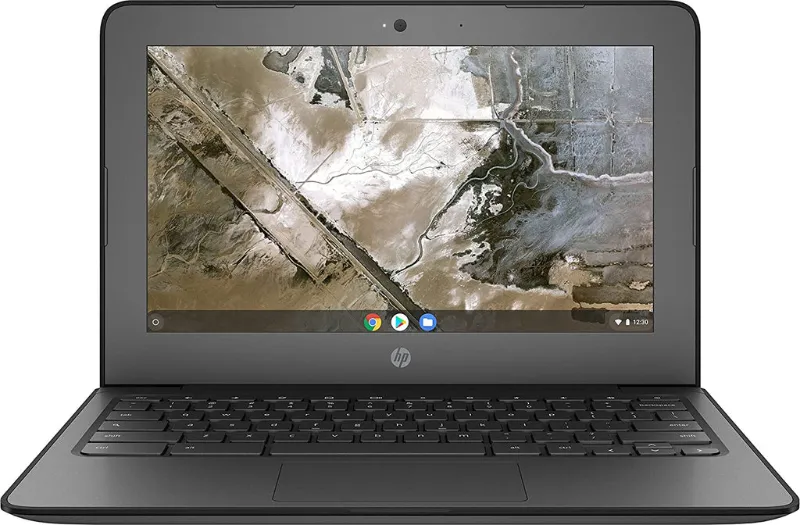
Buying bulk computers is the fastest way to kit out a classroom, a call center, or a growing office without blowing the budget, but only if you know what to look for before you order. Chromebooks dominate the bulk market for good reason: they are cheap to buy, easy to manage from a single admin console, and they rarely need the hands-on support that Windows fleets demand. In this guide, we walk through how to spec, source, and buy Chromebooks in bulk, using the exact models we test and stock in our bulk computers category.
Why Chromebooks Win for Bulk Computer Orders
When you are buying 50, 100, or 500 machines, three costs matter more than the sticker price: the unit cost, the management overhead, and the lifespan. Chromebooks win on all three.
- Low unit cost. Even current-generation Chromebooks often cost a fraction of a comparable Windows laptop, and refurbished or off-lease units cost even less.
- Central management. Google Admin lets IT push updates, apps, and policies to the entire fleet from one dashboard.
- Long support windows. Each Chromebook model carries an auto-update expiration date, so you can plan a 4 to 6 year fleet cycle in advance.
- Fast setup. Unbox, power on, sign in, done. No imaging, no drivers, no per-device configuration.
That last point alone saves schools days of technician time per deployment.
Which Chromebooks to Buy in Bulk: Our Tested Picks
Not every Chromebook suits every fleet. Here is how the models we actually handle break down.
Best for K-12 classrooms: Dell Chromebook 3100 series
The dell 3100 is the workhorse of school deployments. It has a rubberized, spill-resistant chassis, a reinforced hinge, and a keyboard built to survive being shoved into backpacks. If younger students are the users, this is the model we recommend first.
If you want handwriting or tablet use in the mix, the chromebook 3100 2 in 1 flips into tablet mode and works with a stylus, which makes it popular for art rooms and early grades.
Best for office staff and general use: Dell Chromebook 3400 and 11.6 models
For offices, durability matters less and screen quality and performance matter more. The dell chromebook 3400 steps up with a better processor and a more comfortable keyboard for all-day typing. If budget is the priority, the dell 11.6 chromebook and the dell -11-cc11260-11-6- chromebook hit a very low per-unit cost and are fine for email, browsing, and cloud apps.
Staff who run heavier workloads, like multiple browser tabs with video calls, should look at the dell chromebook i3, which pairs an Intel Core i3 with more RAM. It costs more per unit but avoids the complaints that come from underpowered machines.
Best HP option: HP Chromebook 11 G8 EE
The hp chromebook 11 g8 ee is HP's education edition, with a co-molded chassis, tamper-resistant keys, and a battery that comfortably lasts a full school day. It is the strongest alternative to the Dell 3100 line if you prefer HP's build or your district already standardizes on HP.
Best ultra-budget route
When every dollar counts, browse our cheapest chromebook category and the dell chromebook old listings. Off-lease and refurbished units are graded, tested, and cleaned before sale, and they are the single best way to stretch a fixed grant across more seats. Check each model's auto-update expiration before you commit, and compare full dell chromebook specifications so you know exactly what CPU, RAM, and storage you are getting.
Whatever you pick, always verify current pricing through our chromebook laptop category before comparing quotes, and check the latest price with our code before you order.
New, Refurbished, or Off-Lease: What to Buy for Bulk Computers
This is the biggest fork in the road for anyone buying bulk computers for business or education. Here is the honest comparison.
| Option | Typical condition | Best for | Watch out for |
|---|---|---|---|
| New | Factory sealed | Long fleet cycles, warranty-critical buyers | Highest per-unit cost |
| Off-lease / refurbished | Graded A/B, tested, cleaned | Budget-capped schools, labs, hot-desk offices | Cosmetic wear, shorter remaining support window |
| Old stock / discontinued | New or like-new | One-year stopgap fleets | Limited supply, check the update end date |
Our rule of thumb: buy new when the fleet needs to last five-plus years, buy refurbished when you need maximum seats per dollar and can accept minor cosmetic wear. Graded stock from a reputable seller is not a gamble if the seller publishes its grading criteria and warranty terms.
How to Calculate How Many Chromebooks You Actually Need
Overspending on seats you will not use is the most common bulk-buying mistake we see. Before you order:
- Count concurrent users, not total users. A shared lab of 30 students per period needs 30 machines, not 150.
- Add a 5-10% spare ratio for failures, lost chargers, and loaners.
- Check your cart and charging plan first. A charging cart is often required, and cart capacity constrains order size.
- Confirm your management license count. Google's Chromebook management licenses are sold per device.
Buying in one larger order almost always beats multiple small ones, because per-unit pricing drops and freight consolidates. If you are comparing computer wholesale distributors usa against smaller vendors, ask each for a per-unit price at your exact quantity and whether shipping is included. Guides from established wholesale computer parts online sellers and resources like Wholesale Used Computers Export can help you benchmark what legitimate bulk pricing looks like.
What to Check Before You Sign Off on a Bulk Order
- Auto-update expiration date for every model in the quote. This sets the fleet's usable life.
- RAM and storage specs in writing. 4GB RAM is the practical floor for anything beyond single-tab browsing; 8GB if staff multitask.
- Grading and warranty terms on refurbished stock, including who pays return shipping.
- Chargers included per unit. Some surplus lots sell devices without chargers, which erases the savings.
- Management license compatibility with your Google Workspace or Education domain.
- Delivery timeline. Schools usually need units before a term starts; confirm the ship date in the contract.
Where to Buy Bulk Computers with a Discount
We keep a running discount on every order through our store page, and the current offer is 5% off all orders. Whether you are ordering ten units or a thousand, grab the code before checkout; on a bulk order, 5% compounds into real savings that often cover your charging carts or spare chargers. Between the discounted per-unit pricing, graded refurbished stock, and free central management, Chromebooks remain the smartest way to deploy cheap bulk computers at scale in 2025.
Frequently asked questions
Can I manage a whole fleet of Chromebooks from one place?
Yes. Google Admin lets you apply policies, apps, and updates across the entire fleet from one console. Most education and business buyers pair the order with per-device management licenses.
Are refurbished Chromebooks a safe choice for a school or office?
Refurbished units from a reputable seller are tested, graded, and cleaned before sale, and they cost far less per seat. The main tradeoff is cosmetic wear and a shorter remaining software update window, so check the auto-update expiration before ordering.
What is the difference between the dell 3100 and the hp chromebook 11 g8 ee?
The Dell 3100 is built for classrooms with a spill-resistant keyboard, reinforced ports, and a rugged chassis. The HP Chromebook 11 G8 EE is the closest HP equivalent with similar education-focused durability, so the choice often comes down to which brand your IT team already supports.
How many Chromebooks should I order for my organization?
Most organizations order more than their seat count to cover failures and loaners. A common approach is counting concurrent users first, then adding a spare buffer for repairs and chargers.
How long will a Chromebook keep receiving updates?
Chromebooks receive automatic updates until a model's auto-update expiration date, which is set when the model launches. That date determines how long a bulk fleet stays secure and supported, so verify it for each model before you commit.
Can I get a discount when buying bulk computers?
Yes. Our store page currently offers 5% off all orders. On a bulk purchase that discount adds up, so check the code before you check out.