
How Long Do OOSSXX Security Cameras Last? Expected Lifespan and Care Tips for Outdoor Systems

A well-kept OOSSXX security camera typically serves you for around five years or more outdoors, and many owners get considerably longer from the core camera unit when they protect the connections and clean the lens on a routine basis. The shorter-lived parts are usually the seals, gaskets, and power or network cabling, not the camera electronics themselves. Below we break down what actually wears out on an oossxx security camera setup, how to extend its life, and when it makes sense to replace a unit instead of repairing it.
What Determines How Long an OOSSXX Camera Lasts?
Outdoor cameras fail for predictable reasons, and almost none of them are mysterious:
- Water ingress. The number one killer. Water gets in through a cracked housing, a missing grommet, or worse, through the cable entry point where the ethernet or power lead runs into the camera.
- UV and heat cycling. Constant sun degrades plastic housings and softens seals over the years. Cameras mounted under eaves or in shaded spots consistently outlast fully exposed ones.
- Power surges. Lightning strikes and grid surges can take out a camera or the NVR in one hit. Surge protection on the line is cheap insurance.
- Lens and IR window fouling. Dust, pollen, and water spots degrade image quality long before the camera dies, which prompts people to replace units that only need cleaning.
- Connector corrosion. Exposed RJ45 connectors and barrel jacks oxidize. Once corrosion creeps into a connector, you get intermittent dropouts that look like camera failure.
The electronics inside a modern poe security camera system are solid state with no moving parts, so with clean power and a dry housing there is little to wear out. That is why housing and connection care matter more than anything else.
Installation Choices That Add Years of Life
Most of a camera's lifespan is decided on installation day, not afterward.
Mount under cover where possible. Placing each poe outdoor camera under an eave or soffit shields it from direct rain and midday sun. If a camera must be fully exposed, angle it slightly downward so water runs off the lens window instead of pooling on it.
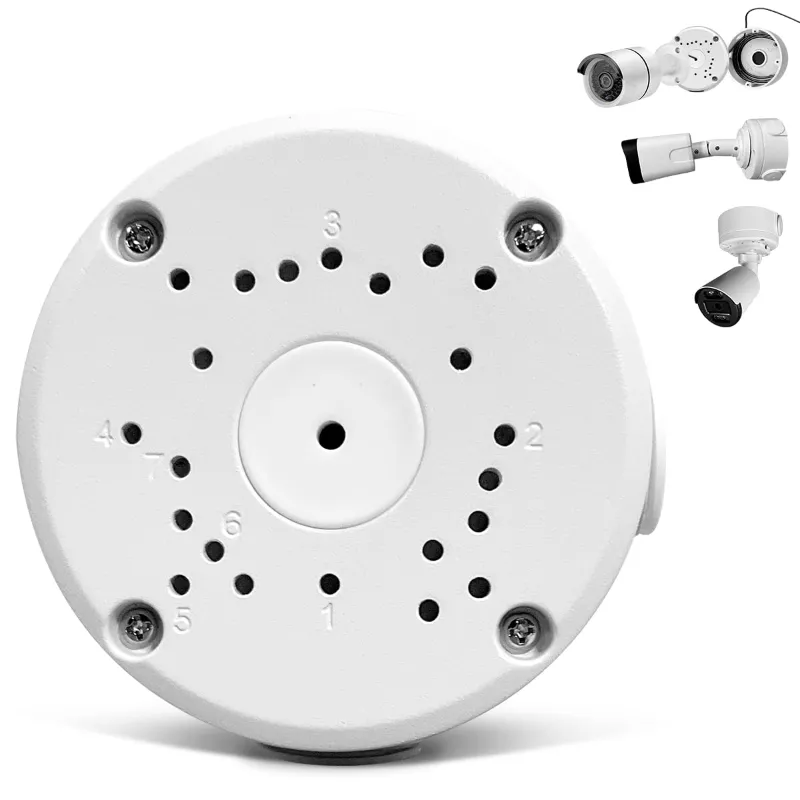
Use a junction box at every cable entry. A security camera junction box hides and protects the connection point at the base of the camera, keeping splices and connectors dry and out of UV light. This single accessory is the cheapest lifespan upgrade you can make, and it also tidies up the install.
Get the mount right. A loose or poorly sealed security camera mounting bracket lets vibration work on the housing seals over time and allows water to wick down the mount into the camera body. Seal the mounting holes with exterior-grade silicone and torque the bracket down properly.
Route cable with a drip loop. Make the cable dip below the entry point before it enters the camera or junction box so water runs down the cable and drips off, rather than following the cable straight into the housing.
Power and Cabling: Why PoE Systems Tend to Last Longer
A PoE setup runs power and data over one ethernet cable, which means fewer wall adapters, fewer barrel connectors, and fewer failure points. If you are choosing between system types, that simplicity is a genuine longevity advantage, not just a convenience.
- Use pure copper ethernet cable rated for outdoor or in-wall use. Copper-clad aluminum cable runs hotter and corrodes at terminations.
- Keep cable runs within spec. Excessively long runs can cause power delivery problems that show up as random reboots, which stress the camera over time.
- Plug the NVR and PoE switch into a surge protector, especially if any cable runs outdoors or through an attic.
If you are starting fresh, a complete poe security camera system with matched cameras and recorder takes the guesswork out of power budgets, and you can check the latest price and our discount code on the store's coupon page before you buy.
Night Vision Care: LEDs and IR Components
Night vision is where most owners first notice aging. Infrared LEDs dim gradually over years of nightly use, and a dirty IR window can halve your effective night range even on a new camera.
- Clean the lens and the IR window gently with a microfiber cloth and water every month or two. Do not use harsh solvents on the coating.
- Check for spider webs and insect nests. Spiders love the warmth near IR LEDs, and webbing across the window causes glare and blur at night.
- If your camera's built-in IR is no longer reaching far enough, adding an external infrared illuminator 850nm or a wider-coverage ir flood lamp lets you boost night range without replacing the camera. Position the illuminator slightly off-axis so the light does not bounce straight off the camera's own window.
For more on real-world ownership of this brand, this independent OOSSXX wireless camera review covers how the cameras hold up in day-to-day home use.
A Simple Maintenance Checklist
Ten minutes a quarter is all a security camera system needs:
- Wipe lenses and IR windows with a microfiber cloth. Check image quality on the recorder afterward.
- Inspect housings and seals. Look for cracks, yellowing, or gaps around cable entries, and re-silicone anything suspect.
- Check connectors. Open each junction box and look for green or white corrosion on terminals.
- Verify recording and alerts. Trigger motion in front of each camera and confirm clips save and push notifications arrive.
- Trim vegetation. Branches scratching across a housing will wear the finish and eventually the seals.
- Update firmware on the NVR and cameras when updates are offered; many fix stability issues rather than add features.
Repair or Replace: Knowing When a Camera Is Done
Not every fault is terminal, so diagnose before you buy a replacement:
- Blurry image at night only: clean the IR window or add an external illuminator.
- Camera drops offline intermittently: test with a known-good cable and port before blaming the camera. Corroded connectors cause most of these.
- Dead camera, no power indicator: check the PoE port output with another device first.
- Physical water damage or a fogged lens from the inside: the seal has failed. At that point replacement is usually the sensible call, because resealing a fogged unit rarely holds.
When you do replace a single camera, a standalone oossxx camera matched to your existing system is usually cheaper than a whole new kit, and you can often grab it with our current discount code. If your cameras are several generations old and you want better night detail or resolution across the board, an upgraded oossxx security camera kit priced via the coupon page can be the better long-term value than patching aging units.
Who Gets the Longest Life from an OOSSXX System?
Homeowners who mount cameras under cover, use junction boxes on every run, and do a quarterly cleaning get the most years out of their gear. The same gear left exposed, mounted on wobbly brackets with bare connectors, will show image degradation and dropouts within a couple of seasons. Treat the install like the weatherproofing job it is, and an oossxx security camera setup will quietly record for years before you need to think about replacing anything.
Frequently asked questions
How long does an OOSSXX security camera last outdoors?
With proper installation and routine care, most owners get around five years or more of reliable outdoor service from the camera unit. Housings, seals, and connectors usually wear out before the camera electronics do.
What is the best way to protect an outdoor camera from rain?
Protect the cable entry point with a junction box, mount the camera under cover if possible, seal mounting holes with exterior silicone, and use a drip loop on the cable so water cannot follow it into the housing.
Why is my OOSSXX camera's night vision getting worse?
Usually it is a dirty or fogged IR window, spider webs near the lens, or aging IR LEDs. Clean the window first, and if range is still short, an external infrared illuminator can extend night coverage without replacing the camera.
Can I fix a camera that keeps dropping offline?
Often yes. Corroded connectors, a damaged cable, or a faulty PoE port cause many apparent camera failures. Test with a known-good cable and port before buying a replacement camera.
Can I replace just one camera instead of the whole system?
In most cases yes, if the replacement camera is compatible with your recorder. Buying a single matched camera is usually cheaper than replacing the whole kit.
How often should I maintain my security camera system?
A quick wipe of the lens and IR window every month or two, plus a fuller inspection of housings, seals, and connectors each season, is enough to catch problems early.