

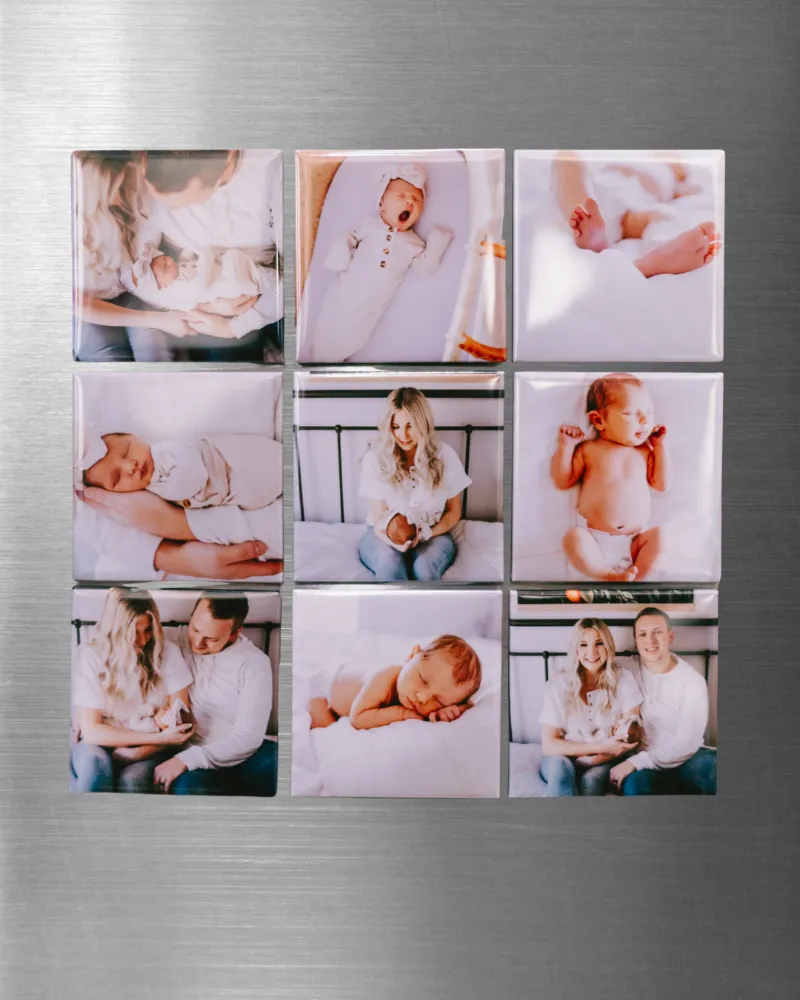
The best magnet photo gift starts with the crop, not the frame: pick a photo where the subject fills the middle of the image, then match it to a size the recipient will actually see every day. In practice that means square and wallet-sized prints for faces, 4x6 for scenes, and a small strip for anything with text. Below we break down what to print, what size works, and which Memory Magnets Co. setup fits the job.
Choose the Photo Before You Choose the Magnet Photo Size
Most disappointing photo fridge magnets fail for the same reason: the picture was chosen from a phone camera roll at full frame, then cropped to a square and lost the subject's head. Work backwards instead.
- Faces first. Crop tight enough that the eyes sit around the upper third of the frame.
- One subject per magnet. Group shots turn into mush at small sizes.
- Skip busy backgrounds. A plain wall or sky reads cleaner than a cluttered kitchen.
- Test the crop on your phone before you print. Zoom to the size you plan to make and look at it for ten seconds.
- Leave a margin. Any border or magnet frame eats into the edges, so keep important detail away from the outside 5mm.
If you are printing for a set, build a theme. A row of baby photos, a row of dog photos, or a row of holiday shots looks intentional on a fridge. A random mix looks like clutter.
What Size Works Best for a Magnet Photo Gift
Sizing comes down to viewing distance and fridge real estate. A magnet you glance at while reaching for milk needs a bigger subject than one you pick up and study.
| Size | Best for | Watch out for |
|---|---|---|
| Square (roughly wallet-sized) | Faces, pets, single portraits | Crops landscape photos hard |
| 4x6 ratio | Scenes, holidays, groups of two | Too wide for a tight fridge door |
| Small strip or mini | Names, dates, save-the-dates | Text gets unreadable below a certain point |
| Large single print | Kitchen noticeboard, gift boxes | Takes up space, best used sparingly |
Two practical rules. First, the smaller the print, the fewer the elements it can hold. Second, if the photo contains text, print it at least one size up from what feels right. Text is the first thing to fail on a small magnetic photo print, and there is no way to fix it after the fact.
For a gift set, mix sizes. One large hero magnet photo plus four or five small ones reads as a considered present rather than a pile of prints. Exact supported print sizes vary by machine, so confirm on the product page before you commit to a batch.
Match the Photo to the Right Tool
The magnet maker machine is the workhorse if you plan to make more than a handful of photo fridge magnets. You feed it prints, it produces finished magnets, and the per-unit effort drops sharply once you are past the first few. It suits classrooms, wedding favours, small businesses, and anyone who makes gifts in batches every Christmas.
The magnet making kit is the better first purchase for most people. It contains the components you need to make a small set without buying a machine, which means you can test whether you actually enjoy the process before spending more. Kit contents explained on the product page will tell you exactly what is included and what you still need to supply, such as your own prints.
If you only want finished product and no assembly at all, order photo fridge magnets directly and skip the making. That route makes sense for client gifts or anything where consistency matters more than cost per unit.
Want the middle option, where you upload images and receive magnetic photo prints ready to use? That is the lowest-effort path that still gets you customised photos rather than stock designs.
We compare these options on three things: how many you need, how much time you have, and whether the images are already printed. If you need 30 magnets by Friday, buy finished. If you need 6 and want them personalised, make them.
How Magnet Makers Work and What Photo Size Compatibility Means
Photo size compatibility is the single spec that trips people up. Every magnet maker has a print area, and images outside that area either get cropped or rejected. Before you order prints, check the supported sizes for your specific model, then set your phone or editing app to export at that exact ratio.
The general workflow looks like this:
- Pick and crop the image to the machine's print ratio.
- Export at a resolution high enough that the print stays sharp at final size. Bigger files are safer than smaller ones.
- Print on the paper type your machine expects. Thin photo paper curls and jams.
- Mount the print to the magnetic backing, smoothing from the centre outwards to push air out.
- Trim, then press the edges down firmly.
Print quality tips that matter more than gear: use even, diffused light when you take the photo; avoid digital zoom; and skip any filter that crushes shadows, because dark detail disappears on a small print. If a photo looks slightly flat and grey on screen, it will look worse on a fridge. Nudge contrast up a touch before printing.
Gifts That Work, and Who Each One Suits
Different occasions call for different photo magnet approaches.
- Grandparents and family: a set of square portraits of grandchildren, updated every year. Cheap to make, genuinely treasured.
- Weddings and engagements: mini save-the-dates, or a small print of the couple for each guest's favour.
- New baby announcements: a strip with name, date, and weight alongside one clean portrait.
- Pets: square prints, tight crop, one animal per magnet. These are consistently the most-requested gift sets we see.
- Housewarmings: the new address printed as a simple design, plus one photo of the house.
- Teachers and coworkers: a group photo cropped to each person individually. Small, fast, and personal.
For anyone who likes doing things by hand, a magnet photo project is also a decent craft activity for older kids, provided an adult handles the trimming.
Supplies, Refills, and Where to Buy With Our Code
Magnetic backing sheets, photo paper, and adhesive are the recurring costs. Buy refills in the same size as your machine's print area, or you will spend an evening trimming everything down by hand. Store sheets flat and away from heat, because magnetic material that has been rolled will not sit flush on a fridge door.
On care: wipe photo magnets with a dry or barely damp cloth, never soak them, and keep them out of direct sun if you want the colours to hold. On shipping and delivery, order well ahead of gift dates, especially for made-to-order sets. Returns and warranty terms differ between the machine and the finished prints, and customer support options are listed on each product page.
To check what the current offer covers before you buy, grab the code and confirm the latest pricing on the store page. It is worth doing before you decide between a kit and a machine, since the difference can change the maths. You can check the latest price for the full range at any time.
Start with one photo you love, crop it tight, print it at the size your setup supports, and see how it looks on the fridge. That single test print answers more questions than any spec sheet.
 Shopping at Memory Magnets Co.? See today's verified Memory Magnets Co. discount code
Frequently asked questions
What size photo should I print for a magnet photo gift?
Square or wallet-sized prints work best for faces and pets, while 4x6 suits scenes and wider shots. Always confirm your machine's supported print area first, because images outside that ratio get cropped.
Can I use my own photos with the magnet maker machine?
Yes, you print your images first and then mount them to the magnetic backing. Export at the machine's print ratio and use a paper type it supports so the sheets feed cleanly.
Is a magnet making kit or a magnet maker machine better for beginners?
Most people should start with a kit to test the process on a small set without a big outlay. Move to a machine once you know you will make photo fridge magnets regularly or in batches.
How long do photo fridge magnets last?
With normal use and a dry or barely damp wipe, they hold up well on a fridge door. Keep them out of direct sunlight and never soak them, since water and UV both shorten the life of a magnetic photo print.
Do I need to trim magnetic photo prints by hand?
If you print on full sheets, yes, you trim to size after mounting. Buying backing and paper in the same size as your machine's print area saves most of that work.
Where can I find the current discount on Memory Magnets Co. products?
The store coupon page lists the live offer, currently $50 off all orders. Check it before choosing between a kit, a machine, and ready-made photo magnets.