

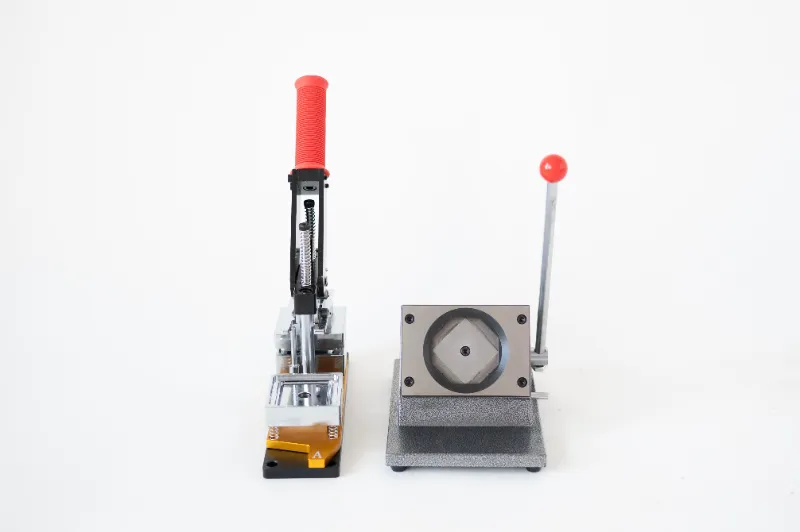
If your photo fridge magnets keep sliding down the door, the culprit is almost always one of three things: too little magnetic pull for the weight, a curved or textured surface, or a print that has curled away from the magnet sheet. Fix the pull, flatten the print, and match the size to the job, and they stay put.
We test magnet-making gear for a living, and the same problems show up whether you are using a small magnet maker or a full magnet maker machine. Here is what is actually happening and how to correct it.
Why photo fridge magnets slide: the three real causes
1. The magnet is thinner than the weight it carries
Standard flexible magnetic sheet is rated by thickness, and surface pull strength rises fast as you go up. A thin sheet holding a standard photo print on a flat steel door works fine. The same sheet holding a laminated print, a heavy card backing, or a large format photo will creep down the door over a few hours. The magnet is not defective. It is just under-specified for the load.
2. Your fridge door is not flat steel
This one catches almost everyone. Modern stainless fridges often have a non-magnetic face over a steel core, side panels that are aluminium, or a curved front that only touches the magnet along a thin line. Glass-front doors behave the same way. A magnet that grips hard on an old enamel door can be useless on a new one.
Quick test: hold a fridge magnet you already own against the door in the exact spot you want your photo. If it holds, the surface is fine. If it barely clings, move to a different panel before you blame your prints.
3. The print has curled or the backing is slick
Paper absorbs moisture from the air differently on each side, so a printed photo on a flexible sheet tends to curl print-side out. Only the edges then touch the steel, which cuts holding force dramatically. Glossy laminates and smooth card backs make it worse because they offer no friction, so the magnet skates.
How magnet makers work, and why it affects grip
A magnet making kit or photo magnet machine does one of two things. Either it pressure-bonds your printed photo to a pre-magnetised flexible sheet, or it prints or laminates directly onto magnetic stock. The bond is the part that matters for sliding.
- Pressure-bonded kits rely on a full, even roll across the whole sheet. Air bubbles and lifted corners are the number one cause of edge-only contact.
- Machine-printed magnetic photo prints bond as part of the print run, so the sheet stays flat and the magnet layer is uniform.
- Cut quality matters too. Ragged or scissor-curved edges lift, and a lifted corner acts like a lever that walks the magnet down the door.
If you are choosing between a hand-press kit and a desktop machine, the machine wins on flatness and consistency, which directly translates to magnets that do not slide.
Fixes you can try in the next five minutes
- Flip it and re-flatten. Place the curled magnet print-side down under a heavy flat book for a few hours, or warm it slightly with a hairdryer on low and press it flat while it cools.
- Add a second magnet layer. Cut a slightly smaller piece of magnetic sheet and stick it behind the original. Doubling the layer roughly doubles the pull, which is usually enough for a heavy print.
- Move to a magnetic panel. Fix a thin steel plate or a magnetic whiteboard to the wall or the fridge side and hang the prints there. This solves stainless and glass doors instantly.
- Size down. A smaller, lighter print holds far better than a large one on the same sheet.
- Roughen the back. A light scuff on a glossy back adds friction and stops the skate.
Photo size compatibility: match the print to the pull
Sizing is the most overlooked part of photo size compatibility, and it is where most disappointed buyers go wrong. Bigger is not automatically better.
| Print size | Best magnet sheet | Typical best use |
|---|---|---|
| Small square or wallet size | Thin flexible sheet | Dense clusters, gift sets, party favours |
| Standard 4x6 style | Mid-weight sheet, single layer | Everyday photo fridge magnets on a flat steel door |
| Large or laminated print | Heavy sheet, doubled layer or rigid backing | Feature prints, magnetic photo prints on a steel board |
When you order, check that your magnet maker machine or kit is rated for the largest print you plan to make. A machine built for 4x6 stock will not produce a flat, well-bonded larger format, and the result will slide.
Print quality tips that also improve grip
Print quality and holding power are not separate problems.
- Print onto the right stock. Too-thin paper wrinkles under pressure and creates air pockets.
- Let prints dry fully before bonding. Residual moisture drives curling.
- Laminate only if your magnet sheet is rated for it. Laminating adds weight and a slick back surface.
- Trim with a straight edge or the machine's cutter, not freehand scissors, so the edges sit flush.
- Keep a clean, dust-free surface when bonding. A single grit of dust lifts a corner.
Setup and first print: get it right once
The photo magnet maker machine style of unit usually needs a short calibration before the first run. Load the sheet, run one test print, check the bond at the corners, and adjust pressure or temperature before you commit to a batch. If you are starting from scratch, read our notes on setup and first print and grab the code before you order, since the current offer takes $50 off all orders.
For small gift batches, a hand-held magnet maker or a magnet making kit is enough. For a steady output of magnetic photo prints or larger magnet photo runs, the magnet maker machine pays for itself in flatness and speed. If you want the finished look without any equipment, buy the ready-made photo fridge magnets and skip the bonding variable entirely.
Supplies, refills, and keeping magnets holding
Magnetic sheet degrades with heat and repeated flexing, so store unused sheets flat, away from radiators. Keep refills matched to the machine you own. Mismatched thickness is a common cause of inconsistent pull, and so is reusing sheet that has already been bent.
On care: wipe magnets with a dry cloth, avoid dishwasher-level heat, and do not leave them in direct sun on a car dashboard. For returns and warranty questions, or if you need customer support options on a machine, check the latest price and store terms on the coupon page before you buy so you know what is covered.
One last note on shipping and delivery: order magnet sheet flat-packed, not rolled. Sheet that arrives on a roll has a memory curl that takes days to flatten out, and it will slide until it does.
Fix the surface, match the thickness to the weight, and keep the print flat. Do those three things and your photo fridge magnets will stay exactly where you put them.
 Shopping at Memory Magnets Co.? See today's verified Memory Magnets Co. discount code
Frequently asked questions
Why do my photo fridge magnets slide down instead of sticking?
Almost always because the magnet sheet is too thin for the weight of the print, or the print has curled so only its edges touch the door. Flatten the print under a heavy book and add a second layer of magnetic sheet behind it.
Will a magnet maker machine work on a stainless steel fridge?
Only if the door face is magnetic steel and not a non-magnetic overlay or glass. Test the exact spot with a magnet you already own before you make a batch, and use a steel panel or magnetic board if the door does not hold.
What size photo fridge magnets hold best?
Small and standard 4x6 style prints hold most reliably on a single layer of mid-weight magnetic sheet. Large or laminated prints need a heavier sheet, a doubled layer, or a rigid backing to stop them creeping.
Do I need a magnet making kit or a photo magnet maker machine?
A hand kit suits occasional gifts and small batches. A photo magnet maker machine gives more even pressure and bonding, which produces flatter magnets that grip better and is worth it if you are making prints regularly.
How do I stop magnetic photo prints from curling?
Let prints dry fully before bonding, bond under even pressure across the whole sheet, and trim with a straight edge. Store unused sheet flat rather than rolled, since a roll memory curl will lift the edges.
Where do I find the discount code and current price?
The Memory Magnets Co coupon page lists the current offer, which is $50 off all orders, along with pricing and store terms.