

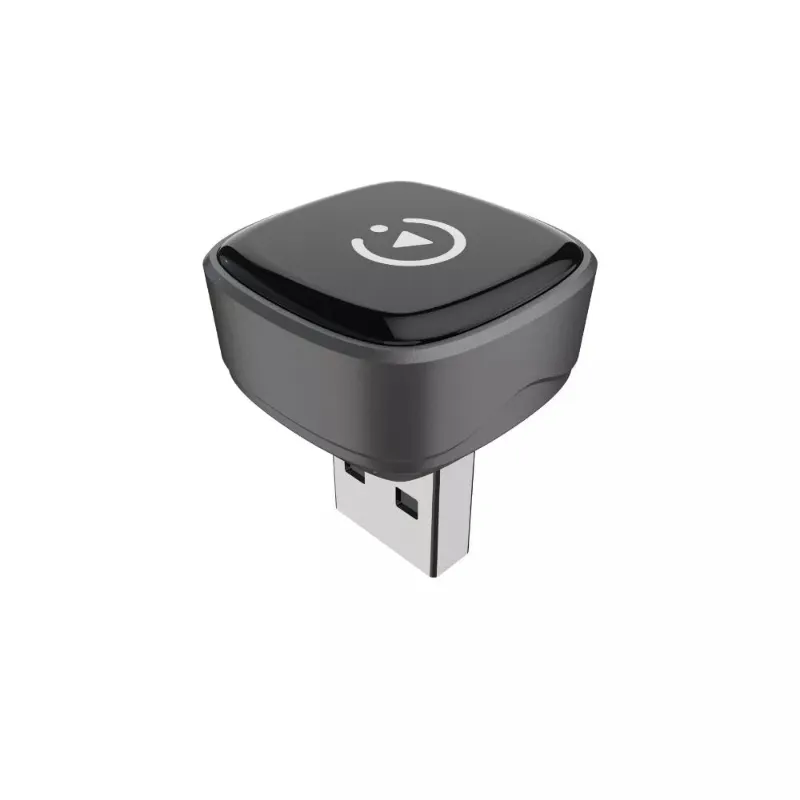
The carlink mini ultra fits any car that already has a working factory wired CarPlay USB port, and the Carlinkit Mini 5 SE follows the same rule, so the question is not whether a mini adapter works but whether your port, phone and firmware will cooperate with it. Below is the exact check we run before recommending either one, plus what to order instead when a mini unit is the wrong call.
The three-minute fit check for a carlink mini ultra
Walk out to the car and confirm four things before you spend anything.
- Wired CarPlay already works. Plug your iPhone in with a cable and watch CarPlay launch on the factory screen. If your car only supports Android Auto, or has no smartphone projection at all, a mini adapter cannot invent CarPlay.
- You know your port type. Mini adapters ship in USB-A and USB-C versions. Some cars have both, and plenty hide the data-capable port in the armrest or glovebox rather than on the dash.
- Your phone is supported. iPhone for CarPlay, Android for an Android Auto wireless connection. Check the listing for the minimum OS version the adapter is tested against.
- The head unit is factory. Aftermarket Android screens usually need a box, not a mini adapter.
If wired CarPlay works today, you are in the right product family and carlink mini ultra is the unit we point most buyers to first. If any of the four checks fails, stop here and read the box section further down.
carlink mini ultra vs Carlinkit Mini 5 SE: what actually differs
Both are compact adapters that give you a wireless CarPlay adapter setup from a wired port. They differ mostly in port style, physical size and how much slack your console gives you.
| Your situation | What to order |
|---|---|
| Wired CarPlay works, you want wireless | carlink mini ultra or Carlinkit Mini 5 SE |
| Console lid barely closes over a dongle | The Mini 5 SE with a short right-angle cable |
| Loose cables keep dropping the connection | A new usb c to usb c cable for carplay |
| You want apps, video and Android on the factory screen | A CarPlay box, not a mini adapter |
The carlinkit mini 5 se is the pick for tight spaces and short runs. If your console has room and you want the version we see the fewest pairing complaints about, start with the mini ultra. Either way, check the latest price on the store page before you order, since the offer changes.
One more option worth knowing about: the carlinkit 5 and carlinkit 5. are the same family of wireless adapters in a different shell, and the carlinkit t2c covers cars where the port sits deep in the console. All three do the same wired to wireless upgrade as the minis.
When a box beats an adapter: AI box versus adapter
If your car has no wired CarPlay, an adapter has nothing to convert. That is the point where an AI box versus adapter decision matters.
- AI box or CarPlay box. The carlinkit tbox ultra 2 and the carlinkit carplay ai box run their own system and push it to the factory screen, which is what you want for streaming video, extra apps or Android Auto on a car that never had it. The carlinkit t-box is the earlier CarPlay box from the same family.
- Mini adapter. Cheaper, faster to install, nothing to update beyond firmware, and the right answer for a car that already does wired CarPlay.
- Adapter kit. The car link kit bundles the adapters and cables in one order, which makes sense if you run two cars or want spares in the glovebox.
Do not buy a box expecting it to fix a broken USB port, and do not buy a mini adapter for a car that only has a mirroring screen. Match the product to the port you actually have.
Cables and USB C cable compatibility
Most "the adapter keeps disconnecting" reports are cable problems, not adapter problems.
- Use a data cable, not a charge-only one. Many short USB-C cables in a drawer are power-only and will never carry CarPlay.
- Keep it short. Under a metre is the safest bet for a stable connection.
- Check the connectors. Your car may be USB-A while the adapter is USB-C, or the reverse. Buy the right combination rather than stacking two adapters.
- For Android phones, the cable usb android auto is built for exactly this job and avoids the guesswork.
- Seat it firmly. A cable that wiggles in the armrest console will drop the connection on every speed bump.
If you are already ordering, grab the code and put the saving toward a proper cable instead of reusing the thin one that came with an old phone.
Setup, pairing and connection fixes
Installation is genuinely a two-minute job, but the order matters.
- Plug the adapter into the car's data port, engine running, before pairing anything.
- Turn on Bluetooth and Wi-Fi on your phone, then open the adapter's Bluetooth entry when it appears.
- Accept the CarPlay prompt on the phone and on the factory screen.
- Once it pairs, delete the old wired CarPlay pairing from your phone to stop the car grabbing the cable session first.
If it will not pair, work through these in order: reboot the phone, forget the adapter in Bluetooth settings, reseat the cable, then try a second phone. If a second phone pairs fine, the problem is your handset, not the unit.
On firmware update guidance, only update through the official app or the vendor's own instructions, and only when you have a real problem. A working adapter that gets a random firmware flash is how good units become returns.
Counterfeit checks, returns and delivery expectations
Spotting counterfeit adapters is easier than it sounds. Buy from a seller with a real product page, check the packaging brand spelling, and be suspicious of a price that is far below everyone else's on the same model. The Mini 5 SE and mini ultra are both copied often.
- Confirm the returns window and who pays return shipping before ordering.
- Keep the box and inserts until you have paired successfully at least twice.
- Test in the car, not on the kitchen table. Pairing indoors proves nothing.
- On delivery expectations, ask the seller for the dispatch estimate to your country rather than assuming a fixed number of days.
Quick checklist before you buy
- Wired CarPlay works in your car today.
- You know whether your port is USB-A or USB-C.
- Your phone meets the listed OS minimum.
- You have a short data cable ready.
- You know whether you need an adapter or a box.
- You have the discount code applied at checkout.
Work through those six lines and the choice between the carlink mini ultra, the Mini 5 SE, the carlinkit 5 and a full CarPlay box stops being guesswork. If you are still unsure, order the mini adapter first. It is the cheapest way to find out how well your car handles wireless CarPlay, and you will know within one drive.
 Shopping at AutoKit CarPlay? See today's verified AutoKit CarPlay discount code
Frequently asked questions
Will the carlink mini ultra work if my car only has Android Auto?
No. A mini adapter converts an existing wired CarPlay connection into a wireless one, so there has to be wired CarPlay in the car already. If your car only does Android Auto or mirroring, look at an AI box such as the carlinkit tbox ultra 2 instead.
Do I need a special cable to use the Carlinkit Mini 5 SE?
You need a data-capable cable that matches your car's port and the adapter's connector, kept short for stability. Many cheap USB-C cables are charge-only and will not carry CarPlay, so check the listing or buy a known car audio cable.
How do I know if my car port is USB-A or USB-C before ordering?
Look at the port itself and at the connector on the cable you use for wired CarPlay today. If both dash and console ports exist, confirm which one actually launches CarPlay, since some ports are power-only.
What is the difference between a mini adapter and a CarPlay box?
A mini adapter adds wireless to a car that already has wired CarPlay. A box such as the carlinkit carplay ai box runs its own system to bring apps and video to the factory screen, which suits cars with no CarPlay at all.
My adapter keeps disconnecting. Is it faulty?
Usually not. Reseat the cable, swap it for a short known data cable, delete the old pairing and re-pair, then test with a second phone. If only one phone drops, the issue is the handset rather than the adapter.
How can I avoid buying a counterfeit mini adapter?
Buy from a seller with a proper product page and clear returns policy, check the brand spelling on the packaging, and treat prices far below the going rate with suspicion. Confirm the returns window before you order.