
How to Install a Rexing Dash Cam: Front and Rear Setup Guide

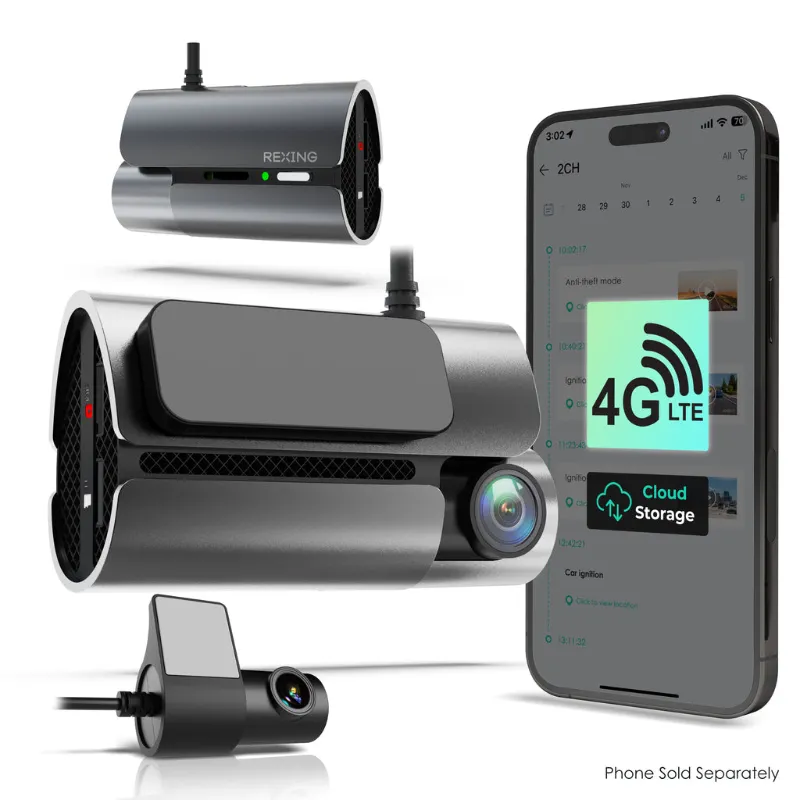
Installing a rexing dash cam takes 20 to 40 minutes and requires only basic tools like a trim removal tool and microfiber cloth. Most models mount to your windshield with adhesive or a suction cup, connect to power via your 12V outlet or fuse box, and record automatically once configured. We've tested dozens of dash cam installations across sedans, SUVs, and trucks, and we'll walk you through the entire process for both single and dual-camera setups.
What You Need Before Rexing Dash Cam Installation
Before you start, gather your camera, mounting hardware, power cable, and a few household items. Check your box for the adhesive mount or suction base, car charger, and any rear camera cables if you bought a dual-channel model. You'll also want:
- Trim removal tool or plastic pry tool (to tuck cables)
- Microfiber cloth and isopropyl alcohol (to clean the windshield)
- Cable clips or adhesive cable guides
- Hardwire kit (optional, for parking mode or cleaner install)
Review the rexing dash cam manual for your specific model. The V1P, V3, and V3C have nearly identical mounting steps, but rear camera cable lengths and connectors vary. If you're comparing units, our rexing v1p flex vs v1p se guide covers the key differences that affect installation complexity.
Front Camera Mounting and Positioning
Choose a spot behind your rearview mirror, centered in the windshield and within the wiper sweep zone. The lens should sit 2 to 4 inches below the top edge of the glass to stay out of your sight line and comply with most state obstruction laws.
- Clean the mounting area with isopropyl alcohol and let it dry completely.
- Peel the adhesive backing from the mount (or attach the suction base).
- Press firmly for 10 seconds, then let the adhesive cure for 15 minutes before attaching the camera.
- Slide the camera onto the mount until it clicks, then adjust the angle so the horizon sits in the middle of the frame.
For 4k mirror dash cam models that replace your rearview mirror, you'll strap the unit over your existing mirror and route the rear camera cable through the headliner instead.
Routing the Power Cable Cleanly
Run the power cable from the camera up into the headliner, across the A-pillar trim, down the side of the dashboard, and into your 12V outlet. Use a trim tool to gently lift the rubber gasket along the windshield edge and tuck the cable inside, then pop the A-pillar trim loose (it's held by clips) to hide the wire behind it.
- Keep cables away from airbag zones (marked with "SRS" or "AIRBAG" tags on trim panels).
- Use adhesive cable clips every 12 inches along the dashboard edge to prevent rattles.
- Leave 6 inches of slack near the camera so you can adjust the angle later.
If your 12V outlet stays powered when the car is off, your camera will drain your battery in parking mode. A hardwire kit taps into your fuse box and cuts power after 12 or 24 hours, or when your battery voltage drops. We recommend this for anyone using the rexing dash cam app to monitor parking events overnight.
Rear Camera Installation for Dual-Channel Models
Dual-camera kits include a rear unit and a 20- to 30-foot cable. The rear camera mounts inside your back windshield (centered, above the license plate view) or outside near your license plate.
Inside mount:
- Clean the glass with alcohol.
- Attach the adhesive mount and camera, angling it slightly downward.
- Route the cable up into the headliner, across the roof to the driver's side, then down the A-pillar to the front camera.
Outside mount:
- Drill a small hole through the trunk or hatch trim (check your manual for the recommended drill bit size).
- Mount the camera with screws, seal the entry point with silicone or a rubber grommet, and route the cable under trim panels to the front.
Inside mounts are easier and reversible, but outside cameras often capture clearer license plates at night. Run the cable through the same channels as your front power cable to keep everything hidden. Check the latest price to see if Rexing bundles include longer rear cables for larger vehicles.
Connecting Power and Testing Your Setup
Plug the power cable into your 12V outlet or connect the hardwire kit to an ignition-switched fuse (one that only has power when the key is on). The camera should boot automatically, show a startup screen, and begin recording within 10 seconds.
Initial configuration:
- Insert a microSD card (most Rexing models require Class 10, 32GB to 256GB).
- Format the card using the camera's menu (not your computer).
- Set the date, time, and video resolution (1080p, 2K, or 4K depending on your model).
- Enable parking mode, G-sensor sensitivity, and loop recording in the settings.
Download the rexing dash cam app (RexingConnect) to preview footage, adjust settings from your phone, and download clips over Wi-Fi without removing the SD card. Test your install by driving around the block and reviewing the video quality. If the rear camera shows a black screen, reseat the cable connector at the front unit.
Rexing Dash Cam Installation Tips for Common Issues
Adhesive won't stick: Cold weather weakens adhesive. Warm the windshield with your defroster for 5 minutes, or use a hair dryer on low heat before applying the mount.
Camera shuts off randomly: Your 12V outlet may have a loose connection or insufficient amperage. Try a different outlet or upgrade to a hardwire kit.
Footage is choppy or corrupted: Format your SD card in the camera every 2 to 4 weeks. High-endurance cards (Samsung Pro Endurance, SanDisk High Endurance) last longer under constant overwriting.
Rear camera image is blurry: Peel off the protective film (yes, there's usually one on the lens). If it's still soft, clean the lens with a microfiber cloth.
Grab the code for 10% off sitewide if you need a replacement mount, longer cables, or a hardwire kit. We've found Rexing's accessories fit tighter and last longer than third-party options, and the discount applies to bundles.
Which Rexing Models Are Easiest to Install
Single-camera models like the V1P and V3 install in under 30 minutes because you only route one power cable. The V3C and V5 add a second camera, which doubles routing time but gives you rear coverage for accident claims and parking protection. If you want the cleanest look, consider the rexing cpw-52 wireless carplay alongside your dash cam so you can centralize cables and reduce dashboard clutter.
Most Rexing cameras weigh under 4 ounces, so suction mounts hold reliably even in summer heat. Adhesive mounts are more permanent and handle rough roads better, but they leave residue if you remove them. Our tests show adhesive gives a steadier image on gravel and potholed streets.
Check customer reviews on Trustpilot to see how other drivers rate installation difficulty and included accessories for your specific model. The V1P consistently scores high for beginner-friendly setup, while the V5 offers pro features like dual-band Wi-Fi and cloud uploads at the cost of a slightly more complex menu.
Frequently asked questions
How long does it take to install a Rexing dash cam?
A single front camera takes 20 to 30 minutes if you're tucking cables neatly. Adding a rear camera extends the install to 40 to 60 minutes because you'll route a long cable through your headliner and trim panels.
Can I install a dash cam without hardwiring?
Yes, most Rexing models come with a 12V car charger that plugs into your cigarette lighter socket. Hardwiring is optional and mainly benefits parking mode by preventing battery drain.
Where should I mount the front camera on my windshield?
Mount it behind your rearview mirror, centered and 2 to 4 inches below the top edge of the windshield. This position stays within the wiper zone, avoids obstructing your view, and usually complies with state visibility laws.
Do I need a special SD card for a Rexing dash cam?
You need a Class 10 or UHS-I microSD card rated for high endurance, between 32GB and 256GB. Standard cards wear out quickly under constant recording, so brands like Samsung Pro Endurance are recommended.
Can I move my dash cam to another vehicle easily?
If you used a suction mount, yes. Adhesive mounts require carefully heating the adhesive with a hair dryer to soften it before removal, and you may need a replacement mount for the new vehicle.
What if my rear camera cable isn't long enough?
Rexing rear cables range from 20 to 30 feet depending on the model. If you drive a large SUV or truck, check the cable length before buying or contact Rexing support to purchase an extension.