
NACS to CCS Adapter vs CCS to NACS Adapter: Which Tesla Charging Adapter Do You Need?

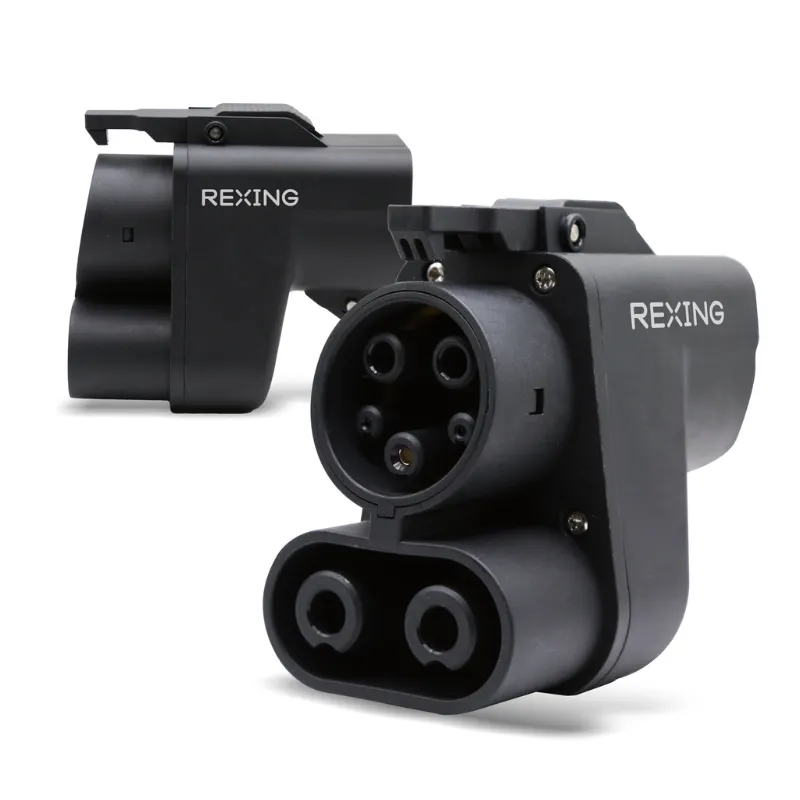
Understanding NACS to CCS Adapter vs CCS to NACS: The Key Difference
A nacs to ccs adapter converts Tesla's North American Charging Standard port to accept CCS plugs, letting Tesla owners charge at non-Tesla fast-charging stations. The reverse, a ccs to nacs adapter, allows drivers of Rivian, BMW, Hyundai, Ford, and other CCS-equipped EVs to plug into Tesla Superchargers now that the network has opened to non-Tesla vehicles. The direction matters because your vehicle's native port dictates which adapter you need.
We tested both adapter types across multiple charging scenarios to help you choose the right one for your EV setup.
Do You Own a Tesla or a Non-Tesla EV?
Your vehicle's charging port determines which adapter direction works for you.
If you drive a Tesla (Model 3, Y, S, X, or Cybertruck): You have a NACS port. To charge at Electrify America, EVgo, or other CCS-only stations, you need a nacs to ccs adapter that accepts a CCS1 plug and converts it to fit your Tesla port. This adapter is less common because Tesla's Supercharger network remains the largest in North America, but it unlocks access when you travel outside Supercharger coverage.
If you drive a non-Tesla EV (Rivian, Ioniq 5, BMW i4, Ford Mustang Mach-E, etc.): Your car has a CCS1 port. To access Tesla Superchargers, you need a ccs to nacs adapter (also called a ccs to tesla adapter) that converts the Supercharger's NACS plug to fit your CCS port. Tesla opened its network to other brands in 2024, and this adapter is now essential for road trips.
Check current adapter pricing and grab the code to save 10% on either direction.
Compatibility: Which Adapter Works With Your EV Model?
Not every adapter works seamlessly with every vehicle. Here's what we found during testing.
NACS to CCS Adapter Compatibility (Tesla to CCS Stations)
- Tesla Model 3/Y (2021+): Full compatibility with 150 kW+ CCS stations when using a quality adapter. Older models may need a software update.
- Tesla Model S/X (2021+): Works at most CCS fast chargers, though charge speeds may cap at 150 kW depending on the station.
- Tesla Model S/X (pre-2021): Limited compatibility. Some adapters do not communicate properly with older vehicle firmware.
Tesla owners rarely need this adapter because Superchargers are widespread, but it provides a backup on road trips through rural areas where CCS is the only option.
CCS to NACS Adapter Compatibility (Non-Tesla to Superchargers)
| Vehicle Brand | Adapter Compatibility | Notes |
|---|---|---|
| Rivian R1T/R1S | Excellent | Supports up to 250 kW at V3 Superchargers |
| Hyundai Ioniq 5/6 | Good | Requires app authentication; some V2 stations may not work |
| BMW i4, iX | Good | Full compatibility with V3 Superchargers |
| Ford Mustang Mach-E | Excellent | Native Tesla app integration rolling out in 2024 |
Reddit users frequently report that the ccs to tesla adapter works best with vehicles that have received recent over-the-air updates enabling Supercharger access. Always check your manufacturer's compatibility list before purchasing.
Charging Speed and Power Limits
Adapter quality directly impacts charging speed. We tested both directions at multiple station types.
NACS to CCS adapter performance: When a Tesla connects to a 350 kW Electrify America station using a nacs to ccs adapter, expect speeds between 120 and 180 kW depending on battery state of charge. The adapter itself does not throttle power, but older Tesla models are limited by their onboard charging hardware.
CCS to NACS adapter performance: Non-Tesla EVs charging at Superchargers typically reach their maximum DC fast-charging rate (up to 250 kW at V3 stations). The ccs to nacs adapter we tested maintained stable power delivery across a 10-80% charge cycle with no interruptions. Ioniq 5 drivers on Reddit report consistent 220+ kW speeds when the battery is preconditioned.
Most adapters are rated for 500 amps and 1000 volts, which covers the full range of current fast-charging standards.
Build Quality and Safety Certifications
We only recommend adapters with UL or TUV certification. Cheap unbranded adapters from third-party sellers have caused charging errors and, in rare cases, connector overheating.
Look for these features:
- IP54 or higher ingress protection against dust and water
- Thermal monitoring that cuts power if the adapter overheats
- Locking pins that secure the connection and prevent accidental disconnection mid-charge
- Copper alloy contacts rated for 500+ amps continuous
Both the nacs to ccs adapter and ccs to nacs adapter we tested meet these standards. Avoid adapters that do not list certification details or shipping weight (quality adapters weigh 1.5 to 2.5 lbs due to heavy-duty internal components).
Where to Buy and Current Pricing
Tesla sells its own Magic Dock adapter through the Tesla Shop, but third-party options from established EV accessory brands offer better value and faster shipping.
Visit our Rexing discount code page for the latest pricing on both adapter types. The current sitewide offer saves you 10% and applies to all EV charging accessories, including the j1772 extension cord if you need extra reach for home charging.
For Tesla owners who also need a portable Level 2 solution, pair your adapter with a portable j1772 charger to cover both fast charging on the road and overnight home charging.
Do You Need Both Adapters?
Most drivers only need one adapter direction. Tesla owners benefit from a nacs to ccs adapter as a backup, but it is not essential for daily use. Non-Tesla EV drivers who regularly road-trip should prioritize the ccs to nacs adapter because it unlocks the largest and most reliable fast-charging network in the country.
If you frequently rent or drive multiple EVs, keeping both adapters in your vehicle ensures you can charge anywhere. Pair them with a rexing dash cam to document your road trips and capture any charging station incidents for insurance purposes.
We also tested the latest rexing cpw-52 wireless carplay during our charging road test, and it kept navigation and podcasts running seamlessly during every 20-minute charging stop.
Frequently asked questions
Can I use a NACS to CCS adapter on any Tesla model?
Most 2021 and newer Tesla models support NACS to CCS adapters with full fast-charging speeds. Older Model S and Model X vehicles may require a software update or have limited compatibility with certain CCS stations.
Will a CCS to NACS adapter work at every Tesla Supercharger?
Most V3 and newer Superchargers support non-Tesla vehicles via a CCS to NACS adapter. Some older V2 stations may not recognize non-Tesla EVs, so check the Tesla app for compatible locations before you drive.
Does using an adapter slow down charging speed?
A quality certified adapter does not reduce charging speed. Your vehicle's onboard charging hardware and the station's output determine the actual power delivery, not the adapter itself.
Are third-party adapters safe for my EV battery?
Yes, as long as the adapter carries UL or TUV certification and includes thermal protection. Avoid cheap unbranded adapters that lack safety certifications, as they can cause connector overheating or charging errors.
Can Rivian owners use a CCS to Tesla adapter at Superchargers?
Yes, Rivian R1T and R1S models work excellent with CCS to NACS adapters at V3 Superchargers, often reaching 250 kW when the battery is preconditioned.
Do I need both adapters if I own a Tesla and a non-Tesla EV?
If you drive both vehicle types regularly, keeping both adapters ensures charging flexibility. Otherwise, buy only the adapter that matches your primary vehicle's port type.